
Nexrender review 2026: Features, pros, cons, and the best alternative


Summarize with





If you're looking for a Nerender review that covers its features, pros, cons, pricing, and user reviews, you're in the right place!
This blog covers everything we found out about this video automation tool after testing it ourselves, which means that, by the very end, you'll know exactly if this is the right tool for you - or if you're better off opting for an alternative.
So, grab your popcorn and let’s begin!
What is Nexrender?
Nexrender is a video automation tool built around Adobe After Effects that lets you render videos dynamically using data. In practice, you take an After Effects project, connect it to data, and use Nexrender to generate multiple video versions automatically.
There are actually 2 versions of Nexrender you need to be aware of:
- Nexrender Open Source, available on GitHub.
- Nexrender Cloud, a.k.a. the cloud-based version of this bulk video editor.
Nexrender Open Source is the original open-source solution, while Nexrender Cloud comes from the same creator but is built as a cloud rendering product that works through an API.
With the open source version, you’re working with code and setting up the whole rendering process yourself. That gives you more control, but it also means you need to be a developer to get it running properly and maintain the infrastructure behind it.
Nexrender Cloud simplifies that part by giving you cloud rendering instead of making you manage your own setup. Still, it’s not a no-code tool. Since it works through API calls, you still need to be comfortable with technical workflows and understand how APIs work. And for anything more advanced, you’ll still need dev assistance.
So while both versions are built around the same idea, they’re not exactly the same tool. That’s why, in this Nexrender review, we’ll look at both separately.
Nexrender (Open-source) features overview
Nexrender Open Source is the original version of the tool, and it’s essentially a piece of code you can find on GitHub, not a ready-made platform you can just sign up for and use.
It’s built for developers who want to automate After Effects rendering by setting up their own workflows, infrastructure, and logic around it.
That said, let's dig deeper into the features behind it.
After Effects compatibility
Nexrender works directly with Adobe After Effects project files, which is the foundation of how the whole tool operates.
You create your video template in After Effects, and Nexrender takes that project and renders it using the data you provide.
What’s important here is how it actually handles that process.
Instead of opening AE like you normally would, Nexrender uses the aerender command-line tool to render projects in the background. That means everything runs without a visual interface, purely through scripts and commands.
To make a project dynamic, you define a ‘’job’’ using JSON. Inside that job, you specify:
- Which AE file to use
- Which composition to render
- What elements (text, images, video, etc.) should be replaced
The tool copies the original project during rendering, swaps out those elements, and generates a new version of the video automatically.
This setup gives you a lot of flexibility, as anything you can change manually inside AE, be that text, footage, colors, positions, etc., can be automated through Nexrender.
Video rendering
Nexrender doesn’t come with built-in rendering infrastructure. There’s no cloud rendering out of the box, and it’s not ‘’local rendering’’ in the simple sense where you just install an app and click render.
Instead, you’re responsible for setting up the entire rendering environment yourself.
Under the hood, Nexrender uses After Effects’ aerender command-line tool to process videos, as we mentioned. That means rendering happens on whatever machine you configure. It can also handle rendering across multiple machines at once, which makes it possible to scale with the right setup. Yet again, that setup doesn’t come pre-built.
Why, yes, you get complete control over rendering. But at the same time, you also take on the responsibility of maintaining it. That includes keeping the primary workstation and other machines running, handling failures, managing storage, and making sure everything stays in sync, among else.
Bulk dynamic video creation
Nexrender supports bulk video creation, but the way it handles it is fairly straightforward.
You generate multiple videos by feeding it structured data through JSON or CSV files. Each video is handled as its own job and those jobs can be processed across one or more machines, depending on the configuration.
That said, there are two limitations to keep in mind.
First, Nexrender doesn’t support any data sources other than JSON and CSV, which means there are only 2 ways to bulk create dynamic videos.
Second, personalization depends entirely on how the original AE project is built. The tool replaces assets and values, but it doesn’t dynamically adjust layouts during rendering.
In practice, this can lead to issues like longer text overflowing outside of text boxes, images not fitting properly into predefined frames, or elements appearing out of sync if their timing wasn’t carefully planned in advance.
Integrations
The open-source version of Nexrend doesn't come with any integrations.
Don't get me wrong, you can absolutely connect the tool to the rest of your tech stack. However, to do so, you need to build the integrations yourself. Talk about time-consuming!
Security
Since users are running everything on their own infrastructure, data security is entirely up to them to set up. That also means that default standards, GDPR and ISO 27001, are not baked into the tool itself.
Support
Given that Nexrender Open Source is a GitHub project, there’s no dedicated customer support behind it, either.
What you do get is documentation. And to be fair, it’s quite detailed. Still, it's written for people who know their way around the code.
So while help is technically there, it’s not the kind that will make the tool easier for non-tech users. To actually get any value from it, you still need to be one, or, at the very least, have one on your team.
Pricing
Nexrender Open Source is free to use. That’s obviously a big advantage, especially for those who have the technical knowledge to set everything up themselves.
That said, ''free'' doesn’t necessarily mean cost-free. You still need to account for the infrastructure, maintenance, and the time required to get everything running and keep it that way.
Reviews
Nexrender Open Source doesn’t have a dedicated page on review websites like G2 or Capterra, so we weren’t able to find Nexrender reviews, per se.
Nonetheless, we found a couple of comments on YouTube from their actual users that point to some downsides we talked about before.
Namely, one user says:
‘’Great script but for me it's really hard to use. I just don't have such skills.’’
And another says:
‘’As a designer who can’t code its a little intimidating.’’
And that sums up our thoughts exactly: It’s a great option if you’re a developer. But if you’re a motion designer, not so much.
Nexrender Cloud features overview
It seems that Nexrender recognized that their original version was too dev-dependent, so they came up with a cloud-based one - an actual SaaS platform - that's a bit more accessible.
That said, let's look at what they actually bring to the table.
Web application
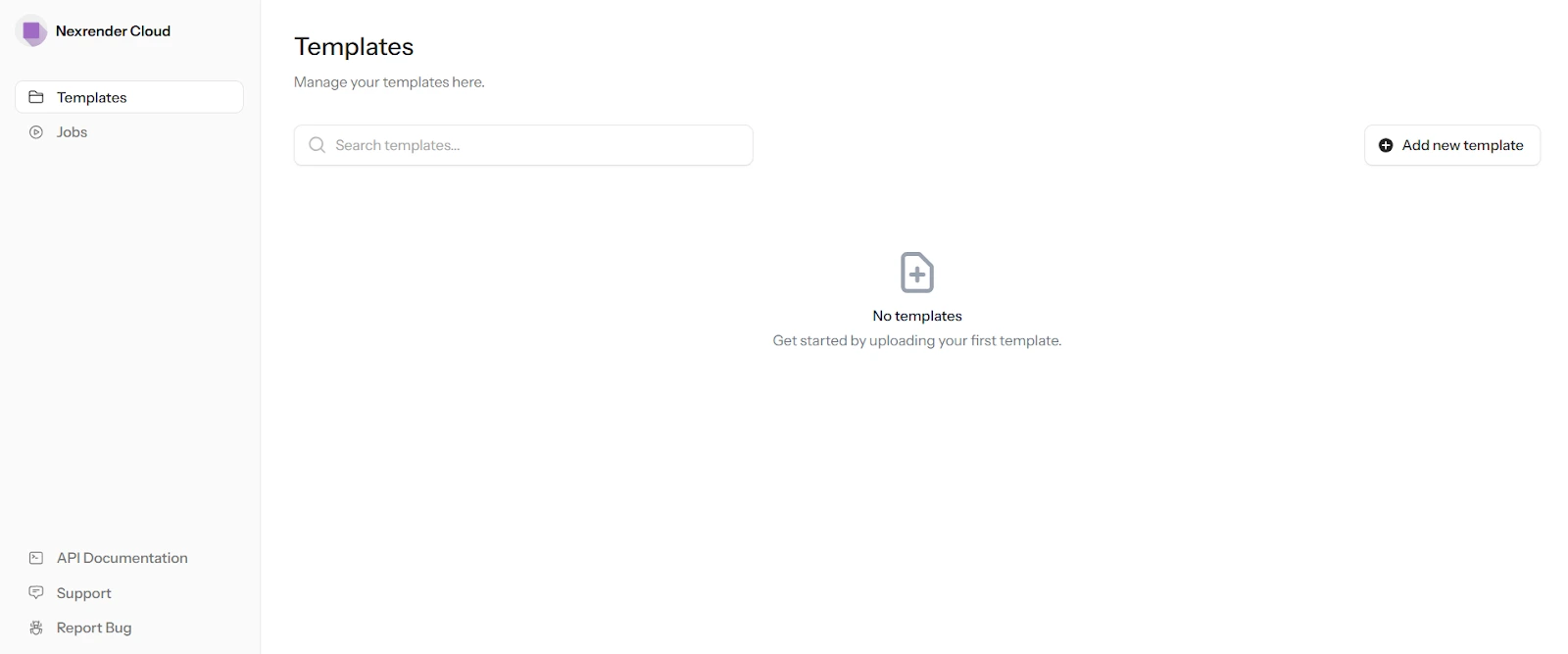
Nexrender Cloud does come with a web application, but it’s closer to a dashboard than a full no-code video editor.
You can use it to import templates, manage assets, access your API key, and keep track of jobs. So yes, there is a carefully designed application that adds the visual layer to the product. But the actual rendering workflow revolves around the API.
In other words, the web app helps you manage things, but it doesn’t remove the technical side of the tool. You still need to know how to submit jobs, structure requests, and connect everything properly if you want to use it to its full potential.
After Effects compatibility
.webp)
Just like the open-source version, Nexrender Cloud works with After Effects projects. You can upload files in .aep, .mogrt, or .zip format, prepare them as templates, and use them as the base for automated video versioning.
So in that sense, the core idea stays the same: you build your template in AE first, and then Nexrender Cloud allows you to automate the video production.
Cloud-based After Effects rendering
The main difference between the open source and the cloud version is that, this time around, you’re not the one setting up a custom rendering environment behind it.
Nexrender Cloud comes with its own cloud rendering infrastructure built around After Effects. So once your template is ready, you define rendering settings and submit rendering jobs through the API, and the platform handles the rendering on its own side.
.webp)
That’s a big step up in convenience, since you’re no longer responsible for managing worker machines, scaling the setup, or keeping the rendering environment running yourself.
Be that as it may, the process is still very much technical. Why yes, the infrastructure is managed for you, but the way you interact with it is still API-based and therefore, only suitable for tech-savvy individuals.
Bulk dynamic video creation via API
Nexrender's cloud rendering automation for Adobe After Effects handles the bulk video creation through its API rather than JSON or CSV.
You send render requests through API calls, where each request contains the data needed to generate a specific video. This makes the workflow more flexible in terms of how you trigger and manage jobs.
But it’s still not ideal.
First, everything still revolves around their After Effects API. There’s not really a way to transfer data from Excel to video, or any other way to generate dynamic videos in bulk, really.
Also, Nexrender Cloud replaces assets and values, but it doesn’t dynamically adjust layouts during rendering. This can pretty much lead to the same personalization issues we pointed out when talking about their open source version, meaning longer text might overflow, images might not fit, or elements might completely fall out of sync.
Integrations
Nexrender Cloud doesn't come with native integrations.
Sure, the cloud version is easier to plug into your workflow than the GitHub version because the cloud infrastructure is already there. But when it comes to actually connecting it with other tools, you’re still expected to do the heavy lifting yourself through the API.
So if you want to connect Nexrender Cloud with your CRM, spreadsheet, CMS, or anything else in your stack, you’ll need to build that logic on your own. Which, again, makes it much better suited for technical users than non-tech ones.
Security
Nexrender doesn’t mention GDPR or ISO 27001 anywhere on its website or in its documentation, which likely means they don't meet these compliance standards.
That's not to say they have zero security measures in place, but the lack of any public mention of the above means you should exercise caution when using Nexrender Cloud, especially in enterprise environments.
Pricing
.webp)
Nexrender offers 3 subscription packages for its cloud version, and you can pay in EUR or USD:
- Pay-As-You-Go at €99/$119 per month, with the added price of €0.18/$0.21 for every render minute. This plan includes 10 concurrent renders, 20GB of storage, and a 14-day video retention period.
- Dedicated Engine at €350/$420 per month. Users get unlimited storage, 30-day video retention, scripting support, and smart template caching.
- Enterprise - Custom-priced, but adds in additional enterprise-level features, such as SLA guarantees, custom regions, plugin support, and single sign-on (SSO). Users also get access to a dedicated manager.
Reviews
Much like with the open-source version, Nexrender Cloud doesn’t have a presence on review platforms.
So instead of relying on 3rd-party reviews, we’ll speak from our own experience using the tool and sum up what we’ve said so far in this Nexrender review.
Nexrender Cloud does a good job at solving one of the biggest pain points of the open-source version - rendering infrastructure. Not having to set up and maintain your own machines is a major plus, if you ask us.
Yet, the overall experience still feels very developer-oriented. Even with the cloud version, you’re still working with APIs, which are not the easiest to work with without some level of technical knowledge.
So while it’s definitely a more convenient option of the two, it’s not a tool just about anyone can jump into and start using immediately.
Best Nexrender alternative: Plainly Videos
As you can see, if you’re not a developer, Nexrender can feel like more work than it’s worth.
From our experience, both the open-source and cloud versions are powerful, but they require technical knowledge, API handling, and a lot of setup to get real value out of them.
But you know what video automation software doesn’t require any of this? Plainly Videos!
Instead of building your own rendering pipeline, managing APIs, and fixing template issues manually, you get a platform that’s designed to handle all of that for you.
With Plainly, you can:
- Create dynamic video templates directly in After Effects
- Connect your data sources without writing code
- Control personalization without worrying about the videos breaking
- Render videos in the cloud without managing infrastructure
In other words, you get the same end result - automated video creation - but without the technical overhead that comes with Nexrender.
Why Plainly is a better fit for most users
Advanced After Effects compatibility and infrastructure
Plainly, just like Nexrender, uses After Effects templates as the foundation of its workflow.
That means you create your video template directly in AE, mark the dynamic elements you want to change, whether that's text, images, footage, colors, or audio, and then use that template to generate multiple video versions automatically.
Now, remember how we said that Nexrender open source supports only 2 data sources - CSV and JSON - whereas the cloud version only supports API? Well, Plainly supports a lot more, including CSV files, Google Spreadsheets, Airtable, and API, among others, which makes it more flexible in real production environments.
On top of that, the cloud rendering infrastructure is already handled for you. So instead of setting up machines, maintaining workers, or worrying about scaling, you can focus on building templates and generating videos.
Layer scripting
.webp)
One of the biggest challenges with dynamic video creation is making sure everything actually looks right once the data is applied to the template.
Luckily, Plainly comes with advanced layer scripting that lets you:
- Adjust how text scales or wraps based on its length
- Control timing between elements so everything stays in sync
- Adapt layouts depending on the size of images or videos
- Apply logic to layers and compositions so they behave differently for each render
So instead of hoping your template works for every variation, you can define exactly how it should behave in different scenarios.
True feature parity between the Web app and the API
Everything you can do in the Plainly web app, you can also do through the API - and vice versa.
In practice, you can start by creating and managing your videos using the visual interface, and then switch to automation once your workflow is ready, without losing any functionality along the way.
Integrations & workflow support
Another thing that makes a big difference in your day-to-day is how easily you can add the tool to your existing workflow.
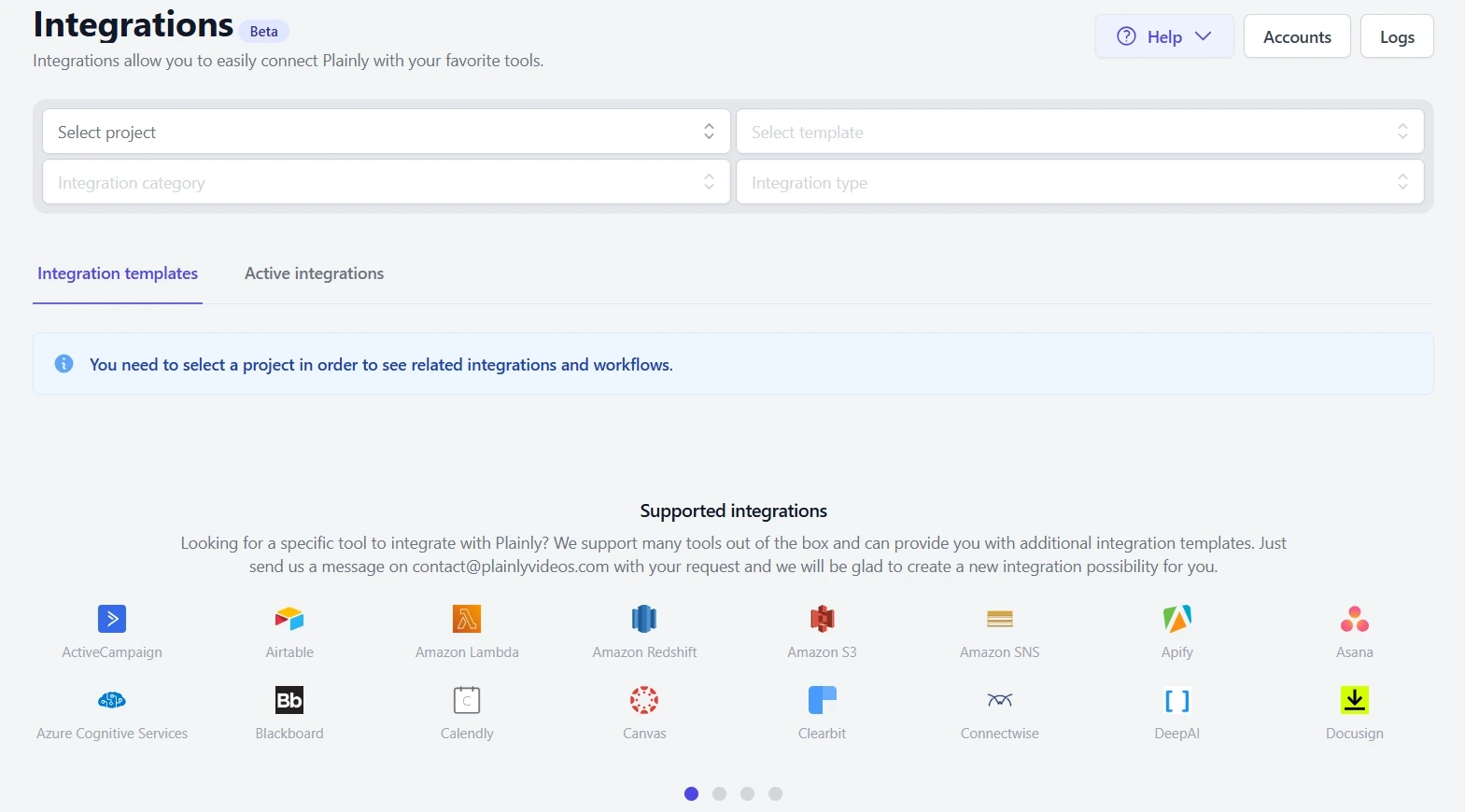
As you've already seen, Plainly doesn't limit you to just one way of getting data in...or out. In addition to supporting multiple data sources like CSV, Google Sheets, Airtable, and API, it also comes with native integrations with 20+ tools. So instead of building custom integrations yourself, you can plug Plainly into your existing workflow and automate what happens before and after rendering. That includes things like sending videos to Google Drive, uploading them to YouTube, pushing them to Frame.io for review, or connecting the tool to thousands of other apps through Zapier.
Focus on high-scale and enterprise use cases
Although it can be used for any project, big or small, we actually designed Plainly primarily with high-volume, enterprise-level video production in mind. It's built to help you generate 100s, even 1000s, of high-quality videos without having you worry about performance, stability, manual editing, or the setup breaking under the load.
And given the enterprise focus, it's only natural that we'd also meet the highest security and compliance standards, including GDPR and ISO 27001.
Support that’s there when you need it
Unlike Nexrender, where you’re mostly left to figure things out on your own through documentation, Plainly gives users access to actual human support when they need it. That includes responsive email support for everyone, and for larger plans, more hands-on help in the form of training sessions, Slack support, and 1:1 calls.
And if you want to see what real users think about that experience (and the tool in general), feel free to check out our G2 reviews.
Pricing
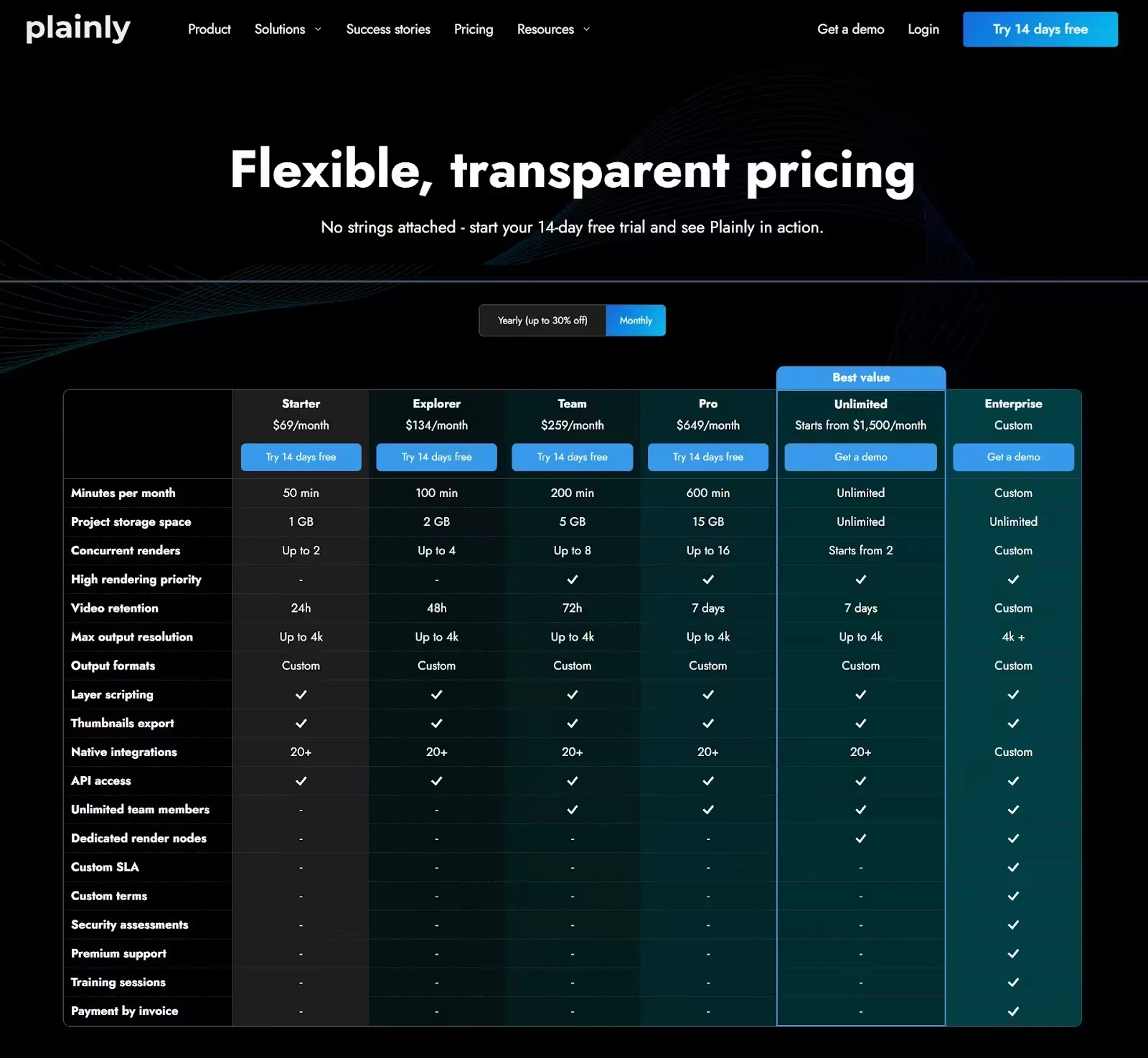
Plainly uses a render-based pricing model, where the main difference between plans comes down to how many video minutes you need per month.
The Starter plan costs $69/month, and it gives you 50 render minutes to start with, along with 1GB of storage, and up to 2 concurrent renders.
If you need more minutes, you can scale to:
- Explorer at $134/month (100 minutes, 2GB of storage, up to 4 concurrent renders)
- Team at $259/month (200 minutes,5GB of storage, up to 8 concurrent renders )
- Pro at $649/month (600 minutes, 15GB of storage, up to 16 concurrent renders)
The Unlimited plan is also available for larger teams and it starts at $1,500/month. As the name suggests, it removes minute and storage limits and allows for higher concurrency, so you can generate multiple videos at once with no bottlenecks.
And finally, there’s an Enterprise plan with custom pricing, built for companies that require higher security measures and custom setups.
Regardless of the tier you choose, you get access to the entire platform, including integrations, API, scripting, and all core features.
Final verdict: Is Nexrender worth it or not?
It might be. If you're a developer who wants complete control over how video automation works behind the scenes, that is.
Both its open-source and cloud versions are powerful in their own way, and they do a solid job of turning AE templates into automated videos.
But as this Nexrender review has shown, that flexibility comes with tradeoffs.
The open-source version requires you to set up and maintain everything yourself. The cloud version removes the infrastructure burden, but it still revolves around the API. On top of that, neither version is particularly friendly to non-tech users, and both come with limitations when it comes to integrations, data sources, dynamic template behavior, and security.
So the better question is - is Nexrender worth it to you?
If you have the tech knowledge, the time, and the resources to build around it, sure. But if you want a tool that gives you the same After Effects-based automation with less complexity, more flexibility, and a much smoother workflow overall, then Plainly is the better fit.
You can start a 14-day free trial or book a demo to see how it works in practice.



