
What are dynamic videos, and how do they work? [Ultimate guide]



Summarize with





The concept of a dynamic video sounds more complicated than it actually is. In reality, it’s a type of video content that can change based on the viewer, data source, campaign, location, product, or any other variable you want to use.
Now, why are they relevant in this day and age? Because with attention spans at an all-time low, generic content can only take you so far. After all, if every viewer sees the exact same video regardless of who they are, where they are, or what they care about, there’s only so much relevance you can create.
In this article, we’ll explain what dynamic videos are, how similar (or different) they are compared to their static counterparts, what types of such videos exist, along with other information that’s worth knowing. We’ll also guide you through the process of creating one yourself, just as we have been doing for years.
Ready? Steady? Let’s go!
What is a dynamic video?
A dynamic video is a form of video where certain elements are automatically changed based on data, viewer behavior, audience segments, or other predefined variables.
Simply put, instead of having one finished video that looks the same for everyone, you have one core template that automatically turns into multiple video versions by swapping specific elements based on your data.
These types of videos are valuable in several areas, notably in marketing, sales, and even education, mostly because they make for personalized user experiences.
Speaking of personalized experiences, have you heard of Spotify Wrapped? It’s one of the best examples of dynamic videos in action. Back in December 2016, Spotify decided to surprise its users with recaps of their annual listening habits, complete with their top artists, songs, genres, and minutes listened. They packaged it all in short, shareable videos. But little did they know, this little Christmas gift would turn into an annual celebration that trends across social media platforms year after year after year.
Static video vs dynamic video
The main difference between static and dynamic video comes down to adaptability. A static video stays the same no matter who watches it. Meanwhile, a dynamic video automatically changes based on the viewer, location, audience segment, campaign, platform, product, data source, or any other input you define.
That doesn’t mean one is always better than the other - static videos certainly have their use cases. What it means, though, is that they serve different purposes.
What kind of data can be changed in dynamic videos
Almost any element inside a dynamic video can be changed, as long as that element is connected to your data source or automation setup, including:
- Text and copy - The most common dynamic element. You can change names, locations, product descriptions, prices, stats, CTAs, dates, captions, or any other written element within the video.
- Visual assets - This can include images, logos, product photos, profile pictures, screenshots, icons, etc. For example, an e-commerce brand could create product videos where each version shows a different product image and discount.
- Audio - Audio elements, including voiceovers and background music, can also be changed. Different voiceovers might be used for different regions to localize content, or music might change to suit the viewer’s past preferences.
- Video clips - You can even swap full video clips depending on the viewer, product, location, or campaign. In practice, this means a travel company could show different destination footage based on where the viewer wants to go.
- Colors and branding - This includes anything from different hues to various branding elements, such as fonts, logos, lower thirds, and brand-specific layouts.
- Timing and pacing - Say one version has longer text, different narration, or more data points than another. In that case, dynamic videos can also adjust how long certain scenes, captions, or elements stay on screen.
- Effects - Animations, transitions, overlays, and visual effects can also change based on the video version. That said, a sports recap video could trigger a special animation when a player hits a certain milestone or wins a match.

Benefits of dynamic video
Dynamic videos have so many advantages.
That said, here’s exactly what they bring to the table:
- Increased personalization and relevance - Instead of sending one broad message to everyone and hoping it lands, dynamic videos let you customize the content to various viewers, locations, products, industries, or use cases. This means each version is completely different than the last.
- Higher engagement & retention rate - By tailoring the content to individual viewer preferences, demographics, or behavior, these videos create a more personal viewing experience. And when people recognize themselves, their needs, or their interests in the content, they have a stronger reason to keep watching.
- Better conversion rates - Dynamic videos can make offers, CTAs, products, and messages more specific to each audience segment. In shoppable videos, this can also reduce the steps between product discovery and purchase, making it easier for viewers to act. As a result, engagement and conversions naturally rise.
- Improved ROI & scalability - Let’s be real, creating 100s or 1000s of video versions manually makes absolutely 0 sense. With dynamic videos, you create one strong template, connect it to your data, and generate variations at scale, which helps you get more mileage from the same work and - ultimately - a higher ROI.
- Enhanced learning experience - Dynamic videos are useful for training, onboarding, and education in general because they can adapt to different roles, skill levels, regions, and learning styles and paths. Add in the interactive elements, and you’ve got a perfect recipe for conveying complex information in a simple video format.
Types of dynamic video content
There are various types of dynamic video content that serve different purposes and have various use cases, starting from:
Dynamic video ads
Dynamic video ads adapt to individual viewer data, making sure that the content is relevant to the viewer's preferences and behavior. Such ads often incorporate the viewer's name, location, or previous interactions with the brand.
To paint a better picture, an e-commerce brand could run the same ad template but dynamically change the product image, price, discount, and CTA depending on what each viewer has shown interest in. This makes dynamic video ads an invaluable addition to marketing strategies, given they are especially useful for remarketing, conversion optimization, and dynamic creative optimization (DCO).
Personalized videos
Personalized videos use individual viewer data to make the content feel like it was created for one specific person.
This could include the viewer’s name, company, usage stats, purchase history, progress, location, personal milestones, etc. Spotify Wrapped, which we mentioned earlier, is the obvious example here. Nonetheless, the same idea can be used for donor thank-you videos - like our client, Unicef, did - onboarding videos, event summaries, and product usage reports, among else.

Interactive videos
These are highly engaging videos that allow viewers to interact with the content actively. Primarily, they include clickable elements, such as buttons, hotspots, and quizzes, that enable viewers to make choices and change the outcome. In terms of applications, interactive videos are helpful for educational purposes and product demonstrations.
Localized videos
Need your videos to adapt for different countries, regions, languages, or markets? Video localization is the way to go.
Localizing videos means changing the language, voiceover, currency, CTA, visuals, legal text, or even the products shown in the video. That means a global brand could create one campaign template and automatically generate different versions for the US, UK, Germany, France, and other target markets.
Digital signage
Dynamic video content can also be used for digital signage, especially when the information needs to change often or in real-time. Think airport screens, retail displays, restaurant menus, event screens, public transport updates, and similar - all these can benefit from automated digital signage content creation!
Training videos
Training videos can also become dynamic when they adapt to the viewer’s role, department, location, or skill level. Every new employee at a certain company needs to go through onboarding, right? So, in theory, the company could create a single onboarding template and then generate different versions for the sales, support, marketing, and product teams with information that applies to each role within.
Outreach videos
Prospects are tired of the same-old-same-old outreach messages. They get them in dozens every single day. They crave something different. They crave… videos. In fact, video content alone can increase the cold email response rates by 19%. Make that content dynamic by personalizing the intro, company name, pain point, industry, CTA, and other data points, and you’re sure to capture attention of your prospects and stand out from the crowd.
How do you create dynamic videos?
The process of creating dynamic videos can vary slightly depending on the specific type of video you are aiming to produce.
Nonetheless, the core principles usually remain the same, so let’s explore what you generally need to create such type of content.
What technology do you need for dynamic videos?
To create dynamic videos, you generally need four things, technology-wise:
- Motion design software: To begin the process of creating dynamic videos, you’ll need a video template, which you can create using motion design software. The go-to option here is typically Adobe After Effects.
- Video automation tool: Next up, you'll need a video automation tool like Plainly Videos that allows you to generate videos in bulk. This tool connects After Effects templates with data to render 100s if not 1000s of videos automatically.
- Data sources: Dynamic videos need data to know what should change from one version to the next. This data can come from CSV files, spreadsheets, Airtable, CRM, API, etc.
- Video hosting platforms: Once your dynamic videos are created, you need a platform to host and deliver them to your viewers. Video hosting platforms play a crucial role in distributing video content. Additionally, these platforms enable you to track viewer responses and behaviors, and thus provide valuable insights into the performance of your content.
Not sure what type of automatic video editor software is best for you? We analyzed the top 9 solutions on the market, so there’s no need to scratch your head. Just read through the guide to make an informed decision.
3 simple steps to create dynamic video content
Creating dynamic video content has never been easier.
Since we’ve already covered what dynamic videos are and what technology you need to make them, let’s go through the actual process next.
Step 1: Template creation
To begin, you’ll need to design a template for your campaign. You can do this in After Effects, which is a very familiar tool if you're a video editor. After all, it’s the industry standard for motion design and gives you full creative control over the video’s design, duration, dimensions, animations, etc.
Step 2: Video automation setup
When your template is ready, you need to upload it to a video automation platform and define which elements should be dynamic.

In Plainly, for example, you upload your AE template, select the elements that should change, and connect your data source. This can be a CSV file, a Google sheet, an Airtable, or even the API, depending on how automated you want the workflow to be.
Step 3: Video generation & distribution
After receiving the necessary data, Plainly will automatically generate your videos in the cloud.
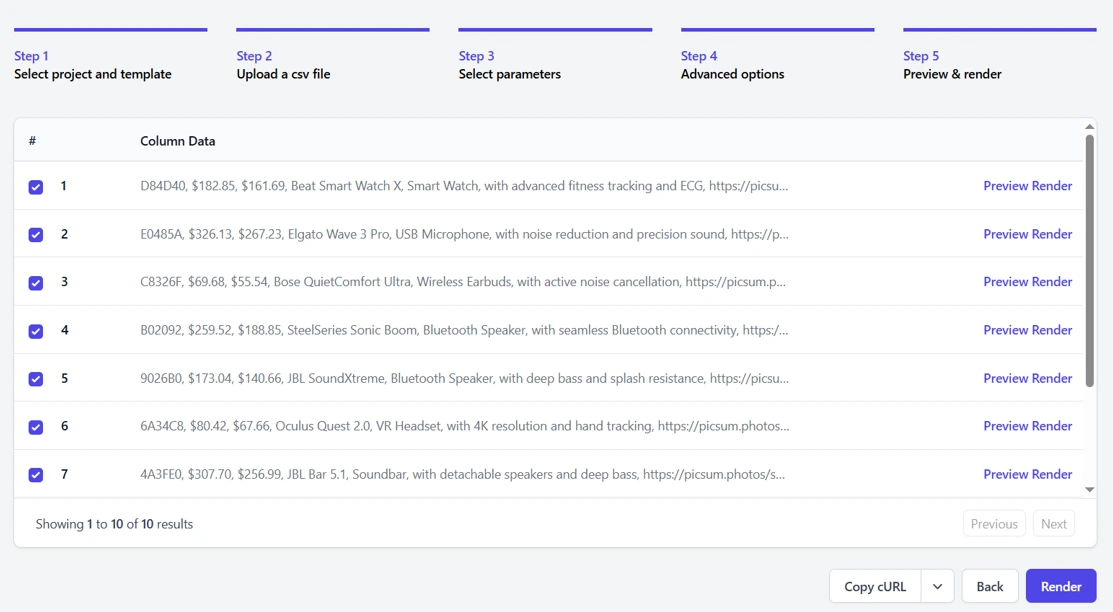
Once rendered, finished videos can be sent to the end users through email or other messaging platforms automatically, courtesy of our integrations with Outlook and Gmail, for example.
If you know your way around the code, you can also use the API to create your own distribution workflow. Or if you’d rather go the no-code route, then you can also use Zapier to automate this part of the process.
Boost engagement and conversions with dynamic video content today!
Dynamic videos have emerged as a powerful tool in the world of content creation. After all, they offer a unique way to engage audiences, convey information, and tell stories in a visually captivating manner.
But to achieve success in dynamic video creation, you need the help of cutting-edge platforms. Luckily, Plainly, a video automation software, is just what the doctor ordered! With a wealth of features and a user-friendly interface, the platform empowers you to make the most of creative versioning and bring all your visions to life.
So, if you’re looking to jump on the dynamic video content creation wagon, sign up for your 14-day free trial now. Or book a demo with us, and we’ll guide you through the process, every step of the way.



