What is video localization? Complete guide [2026]



Summarize with





As you know, English is the world’s most widely spoken language, but only around 1.5 billion people use it. With the global population now above 8.2 billion, that still leaves more than 80% of the world outside the English-speaking audience. So, if your video content is only in English, language alone can stop it from reaching much of your potential global audience.
That’s exactly the problem video localization solves. Video localization is the process of adapting a video for a specific market or audience by translating it into the target language and adjusting elements such as subtitles, voiceover, on-screen text, visuals, and cultural references. The goal is to make the video feel like it was created for that audience specifically, rather than simply translated for them afterward.
But there’s more thaan one way to localize videos. In this guide, we’ll cover why video localization matters, the main methods you can use, and the most common mistakes to avoid. We’ll also show you how to localize videos at scale with Plainly, from preparing your After Effects project and localization data to rendering and distributing versions for different markets.
Need quick answers? Tune in to the video below!
Why does video localization matter?
Video localization matters because showing the same video everywhere doesn’t mean it will resonate everywhere. Language affects whether your target audience understands and engages with your message, while cultural context affects whether that message actually feels relevant. A strong localization strategy helps your video content reach a new market, connect with multilingual audiences, and generate better results from the content you already have.
- Reach viewers you otherwise wouldn’t - YouTube found that creators using multi-language audio generated more than 25% of their watch time from viewers watching in the video’s non-primary language. On Jamie Oliver’s channel, adding multilingual audio helped increase views by 3x.
- Give people content in the language they prefer - According to research cited by Google, 82% of shoppers are more likely to buy a product when an ad is in their own language. Localizing the target language, subtitles, voiceover, and other elements helps remove a major barrier between your message and the people you want to reach.
- Improve the ROI of international video campaigns - Amobear used Google’s AI-powered Video Ads Dubbing to localize video ads into German and Spanish. Its German-dubbed ads delivered a 45% increase in click-through rate and an 8% increase in ROAS, while Spanish ads increased ROAS by 13%.
- Make the message culturally relevant, not just translated - Gaijin Entertainment localized its video ads for Korea by adapting translated voiceovers and text alongside local landscapes, history, and cultural references. The localized ads drove 2x the conversions at half the cost per acquisition compared with the original English ad and achieved 16% higher conversion at 14% lower cost than ads that relied mainly on translation.
7 video localization methods compared
There’s more than one way to localize video, and the right localization method depends on what needs to change and how native you want the final experience to feel. You can make relatively simple changes, such as translating subtitles, or adapt the entire video through dubbing, reversioning, or transcreation.
Here’s how the main video localization methods compare:
4 video localization mistakes to avoid
Most video localization mistakes happen when teams focus only on changing the language and forget about the complete video experience. Whether you use a linguist, AI tools, or a combination of both, these are the mistakes worth avoiding.
1. Treating localization as word-for-word translation
Direct translation can preserve the words while losing the meaning, humor, tone, or cultural context behind them. Effective localization adapts the message to the target audience, not just the target language.
There’s data to back this up. Gaijin Entertainment compared culturally localized video ads with ads that were primarily translated. The localized versions generated 16% more conversions at a 14% lower cost per acquisition than the translated ads.
The lesson: adapt cultural references, messaging, visuals, and tone whenever a direct translation would feel unnatural.
2. Localizing the audio but forgetting what’s on screen
Changing subtitles or adding a dub isn’t enough if the on-screen text, graphics, screenshots, currencies, dates, or other visual elements still belong to the original market. A viewer shouldn’t hear one language while seeing another.
W3C’s definition of localization specifically includes adapting more than language. It also covers elements such as graphics, writing direction, formats, and locally relevant content.
Build these elements into your video localization strategy from the beginning, especially if you plan to create several versions of the same video.
3. Making captions & subtitles difficult to read
A technically correct captions & subtitle can still create a bad viewing experience if it is too long, appears too quickly, or breaks sentences awkwardly. Viewers then have to choose between reading the subtitle and actually watching the video.
Netflix, for example, limits most Latin-alphabet subtitle templates to 42 characters per line and generally allows no more than two lines on screen.
So, when using subtitles, don’t optimize for literal translation alone. Optimize for reading speed, timing, line breaks, and clarity.
4. Letting AI handle the final version without review
AI has made video translation, subtitles, voiceovers, and AI dubbing much faster, but automation shouldn’t remove quality control from the workflow. Names can be mispronounced, brand terminology can be translated incorrectly, and a grammatically correct line can still sound unnatural to a native speaker.
That’s why current AI video localization tools include review controls. HeyGen, for example, lets users edit translations, control pronunciation, apply brand glossaries, and proofread translated videos before generating the final version.
For important localization projects, have a native speaker or linguist review the finished video before publishing it.
How to localize videos with Plainly Videos
Plainly Videos is a video automation platform built for creating multiple versions of the same video from an After Effects project. It’s especially useful for video localization when you need to change several elements such as subtitles, voiceovers, on-screen text, images, or footage across multiple markets instead of editing every version manually. Plainly turns one After Effects template into a scalable versioning workflow that can generate hundreds or thousands of localized videos from your data. Here’s a step-by-step guide for setting it up.
Build your project in After Effects
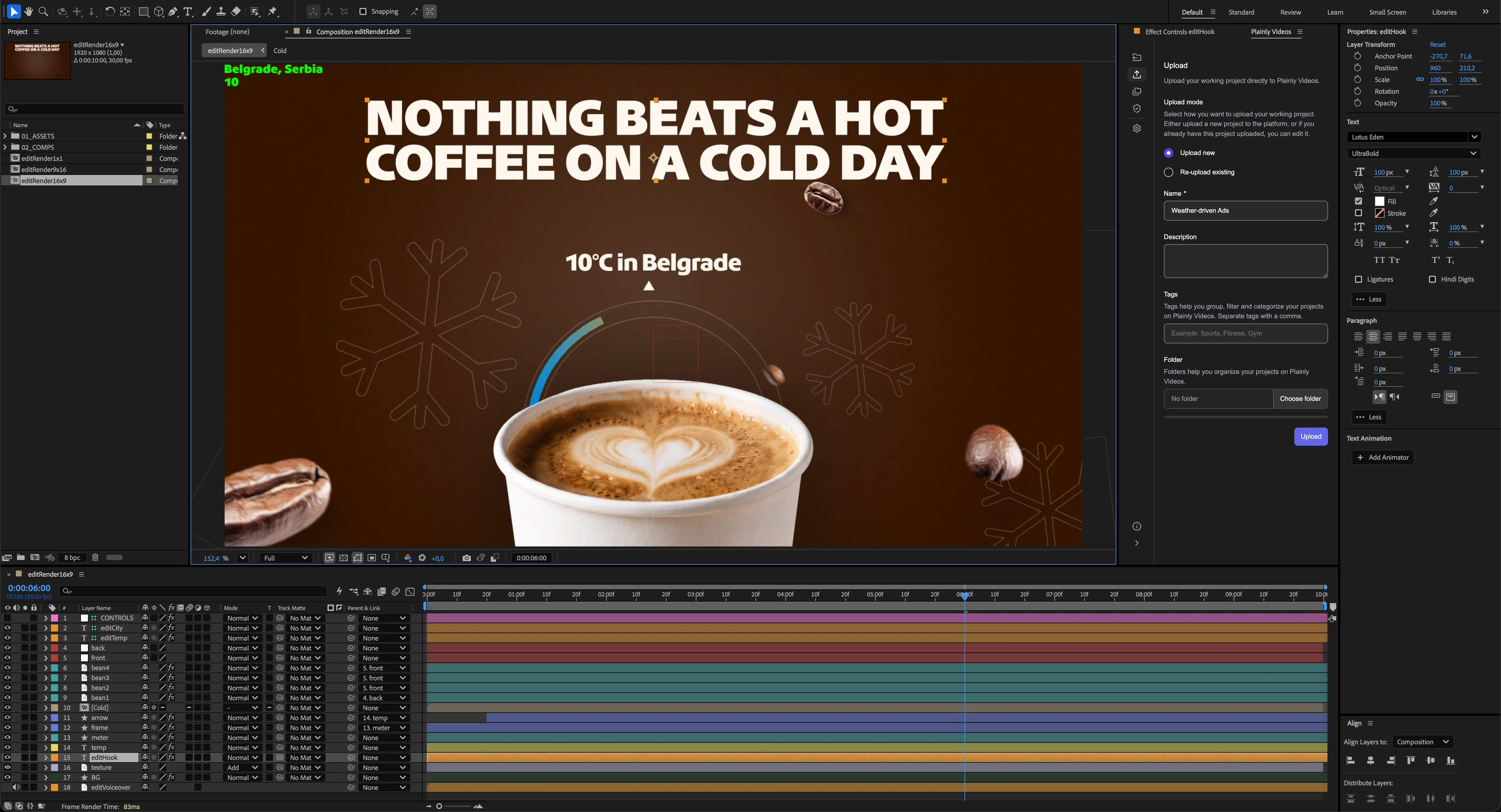
Start by creating the original video in Adobe After Effects just as you normally would. Plainly works with custom After Effects projects, so you can keep your existing design, animations, branding, and creative setup rather than rebuilding the video in another editor.
Upload your project to Plainly
Upload the project and its assets to Plainly, or use the Plainly After Effects plugin to send the project directly from After Effects. The plugin can package the project, assets, and fonts and upload everything to your Plainly account without a separate export-and-upload workflow.

Decide which elements will change for each market
Identify the layers that need to vary between localized versions. Depending on your video localization strategy, this could include the target language, subtitles, voiceover, on-screen text, images, video clips, colors, or other market-specific elements. Plainly lets you turn these layers into dynamic parameters so their values can change for every render.

Prepare your data
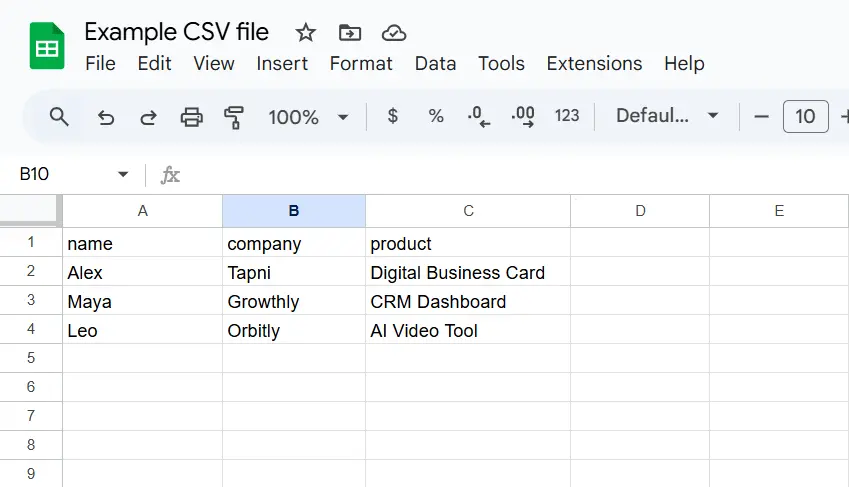
Next, organize everything that should change across markets into structured data. For example, each row of a CSV can represent one localized video, while columns contain the translated text, image URLs, voiceovers, CTAs, or other values that should appear in that version. Plainly can also connect to data sources and workflows such as Google Sheets, integrations, or its API.
Render your videos
Upload your CSV and map its columns to the dynamic parameters in your Plainly template. Then start a batch render, and Plainly generates the different video versions in the cloud without requiring you to open After Effects and edit each one manually. The web app currently supports batches of up to 5,000 renders at once.

Download or distribute your videos
Once rendering is complete, you can download individual videos or download the results of a batch together. You can also build distribution into your localization workflow using Plainly integrations, webhooks, cloud storage, or other connected destinations.
Ready to scale video localization without rebuilding every version?
Successful video localization goes beyond translation. Depending on your target audience, you might need to adapt subtitles, dubbing, voiceovers, on-screen text, visuals, cultural references, or even the entire creative concept. The right approach depends on how much of the original video needs to change and how many markets you’re creating content for.
When you only need one or two localized versions, manual editing can work. But once you need to localize videos across multiple languages and markets, with several elements changing in each version, a scalable versioning workflow becomes much more valuable.
That’s where Plainly Videos comes in. You can build one master After Effects project, connect your localization data, and automatically generate different versions without rebuilding every video from scratch.
Want to see what that looks like in practice? Check out the workflow we created for translating video ads, where we walk through how to turn one video into localized variations for different markets.
And if you want to see how Plainly can fit into your own video localization workflow, well, you should book a demo, and we’ll show you how to set it up.