
MoDeck review 2026: Features, pros, cons and the best alternative


Summarize with





If MoDeck has been on your radar as of late, this MoDeck review will help you figure out if it's the right tool for you or if you should go with an alternative.
We've spent extensive time testing MoDeck.io, and in the sections ahead, we'll be walking you through its features, pros, cons, and pricing. You'll also see what real users had to say about it to finally decide if it's worth your time… and of course, your money.
What is MoDeck?
MoDeck is a video automation software built around After Effects templates and collaborative video production workflows.
Put simply, it allows motion designers to prepare a video template in After Effects and then upload it to MoDeck, where other team members can generate new versions of the same video by swapping out text, images, or other dynamic elements. This makes it possible to automate repetitive production tasks without working directly inside AE.
Because of that workflow, MoDeck is usually used by video, marketing, and content teams that need to produce many variations of the same clip. Think localized marketing campaigns, automated news videos, or even large batches of personalized videos.
The platform also focuses heavily on collaboration. A motion designer sets up the template first, while non-technical users handle the actual video generation through MoDeck’s editor. In other words, designers build the system, and the rest of the team uses it.
There is one important detail, though.
MoDeck doesn’t render videos in the cloud. Instead, rendering happens on the machine where the MoDeck desktop application is installed. That machine needs to have AE installed and licensed, since what it essentially does is batch render in After Effects behind the scenes.
MoDeck features overview
Now that we’ve covered what MoDeck is and how it works at a high level, it’s time to take a closer look at the platform’s main features.
From what we’ve seen while testing the tool, MoDeck revolves around a few core components: After Effects compatibility, a desktop rendering application, a simple template editor, and data-driven video generation workflows.
Let’s get into each in detail.
After Effects compatibility
One of MoDeck’s biggest selling points is that it works directly with After Effects templates. So, rather than having to learn a new editor and rebuild the design from scratch, users can use their existing AE templates and upload them to MoDeck. From there, dynamic elements, such as text, images, colors, footage, etc., can be exposed as editable fields.
However, there is a tradeoff. Unlike some newer video automation platforms, MoDeck doesn’t render AE templates in the cloud. The rendering still happens on the machine running the MoDeck desktop app, which means scalability depends heavily on that local setup.
Desktop application
The main part of the MoDeck setup is its desktop application, which acts as the bridge between After Effects and the platform’s online editor.
To use the platform, the motion designer first needs to install the MoDeck app on their machine and connect their account. The app works similarly to tools like Dropbox or Google Drive in that it runs quietly in the background and syncs files through a dedicated folder.
Inside that sync folder, designers place their After Effects motion graphic templates (MOGRT files). Once those files are added, they automatically become available as editable templates in MoDeck’s online editor.
From that point on, invited users can open the template in the browser, adjust the values of dynamic elements, and generate their own video versions without touching the original project.
When someone requests a render, MoDeck generates an After Effects project file and places it in a watch folder, where Adobe Media Encoder automatically picks it up and renders the final video.
That means the computer running the MoDeck app essentially becomes the render server for the entire workflow.
Online template editor
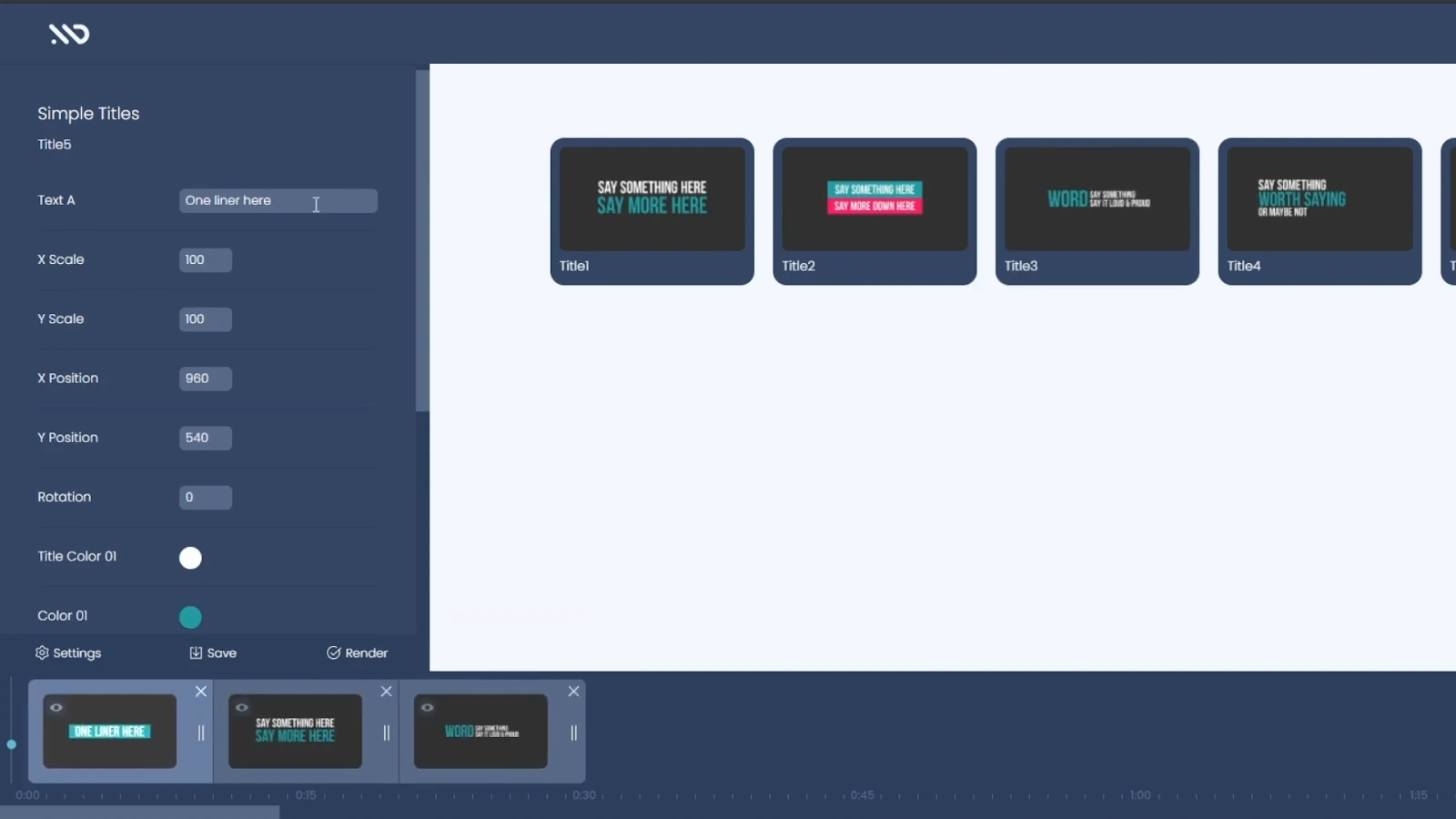
The online editor is the part of the platform that non-tech users interact with the most.
MoDeck actually offers two versions of the editor: a sequence editor and a simpler guided editor.
In the sequence editor, users can build a video by dragging MOGRT blocks onto a timeline and adjusting their settings. Each block exposes options defined in the AE template, such as text inputs, dropdown menus, media uploads, or other editable properties. Users can also preview their changes and render the final video once everything looks right.
When it comes to the simpler editor, instead of working with a timeline, users move through the template option by option, adjusting text, images, and/or other inputs step by step. This makes the editing process a lot easier.
That said, both the sequence editor and the simpler editor are fairly basic in terms of what they can do.
The controls available to online users depend entirely on what the motion designer defined as dynamic in the original After Effects project. If a parameter wasn’t made editable there, it won’t appear in the editor at all. So, if a project requires more complex motion changes, transitions, or dynamic layout adjustments, those edits usually need to happen back inside AE.
Local rendering
As we already explained earlier, MoDeck handles all rendering locally on the machine running the desktop app.
When someone finishes editing a video in the online editor and clicks the render button, the request is sent to the desktop application.
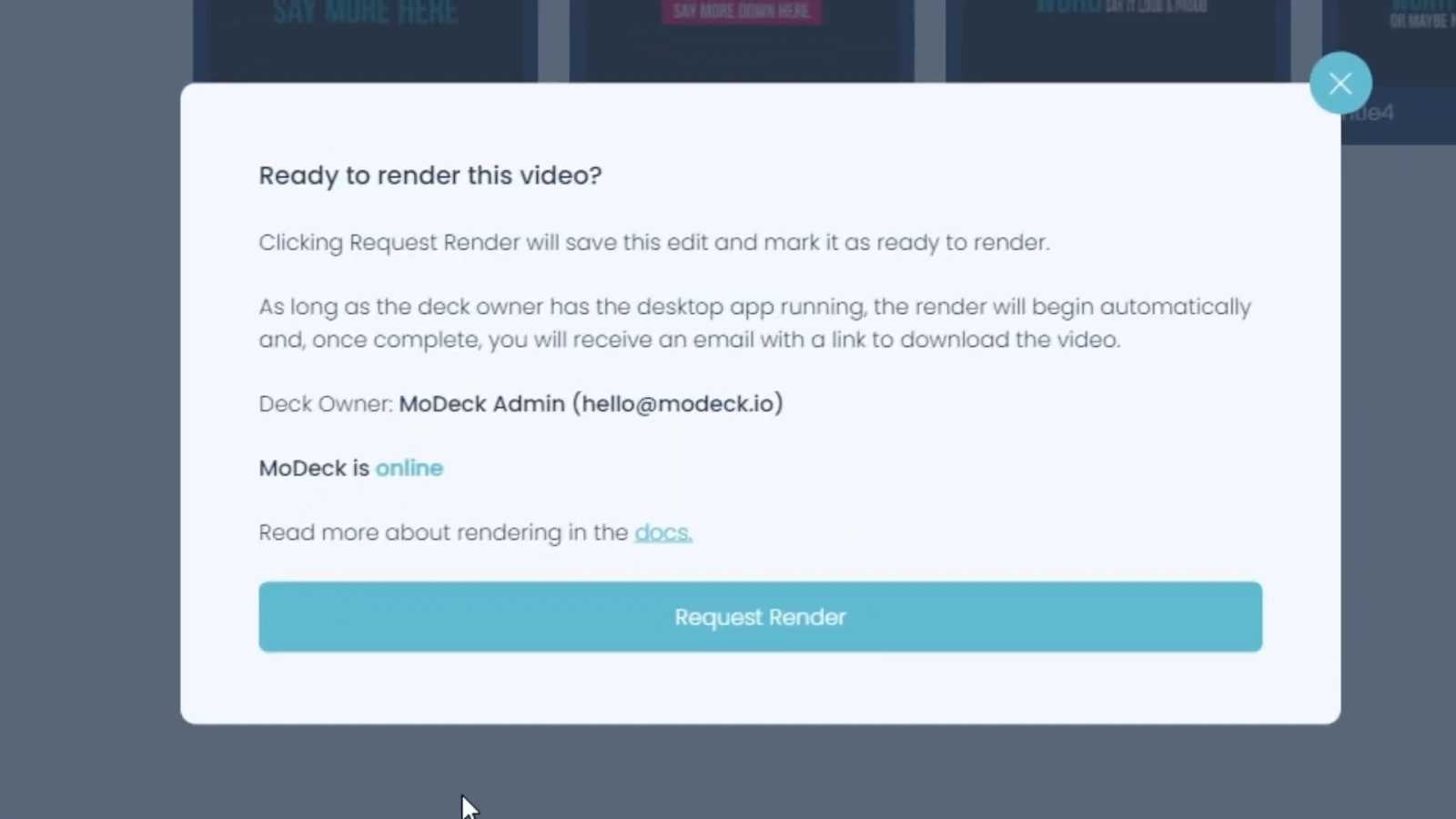
The app then assembles the AE project file, sends it to Adobe Media Encoder, and renders the final video using the output settings defined for that template.
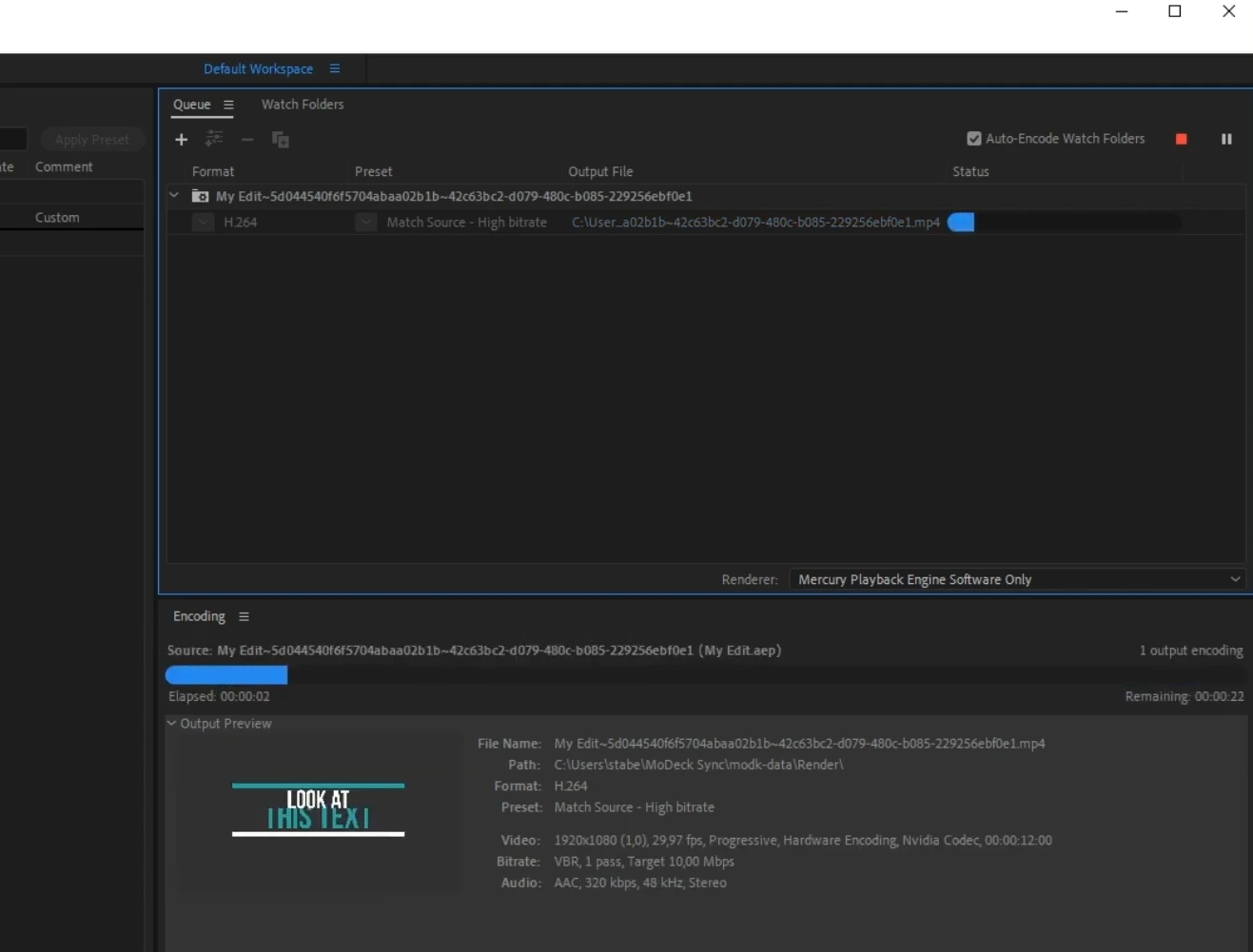
Once the render is complete, the video is first placed in a temporary MoDeck folder and then moved to the final destination folder specified in the render settings. The desktop app can also apply naming conventions to the output files, including dynamic data from the template itself.
This approach has one clear advantage: no project files or media assets leave the machine running the desktop app. Everything stays local.
But at the same time, that comes with a few practical limitations. To paint a better picture, the computer needs to stay powered on and connected if someone wants to render a video. Say the machine is turned off, busy with other tasks, or simply unavailable. In that case, renders have to wait until it’s back online.
Even MoDeck itself admits certain issues can arise. Renders can fail if the machine runs out of disk space or if temporary files pile up and need to be cleared through the app settings. Problems can also appear in the rendered video itself, such as layout or timing issues, which require opening the generated AE project file from the temporary folder to debug what went wrong.
There can also be situations where background instances of After Effects or Media Encoder get stuck and need to be restarted before rendering works again. None of these are unusual for local rendering workflows, but they do add another layer of maintenance compared to platforms that handle the process in the cloud.
Bulk data-driven video creation
MoDeck also supports bulk video generation using structured data, which allows teams to create multiple versions of the same video automatically.
Nevertheless, there are a few constraints to keep in mind.
First, the platform relies on CSV and JSON inputs only for data-driven rendering. Therefore, it’s not as competitive compared to tools that allow users to go from any spreadsheet to video, or use Airtable data or Zapier interface forms to drive new video versions.
Second, the previously mentioned local rendering setup becomes more noticeable when generating videos in bulk. Because every render request still goes through the machine running the MoDeck desktop app, large batches of videos can take longer to process compared to platforms that distribute rendering across cloud infrastructure.
Finally, MoDeck doesn’t offer deeper template automation features such as layer-level scripting or dynamic layout adjustments during rendering. This means elements like text length, image proportions, or video duration aren’t automatically adapted in the same way they would be in more advanced automation setups. Say one headline is much longer than expected or an image has different dimensions. In that case, the template won’t automatically resize or reposition those elements. Instead, the template needs to be designed in a way that already accounts for those variations.
API & Integrations
MoDeck offers an API that lets developers interact with the platform directly rather than through the online editor.
Unfortunately, the API itself is fairly basic, as the only available endpoints revolve around core actions such as listing templates, triggering renders, and checking render status. That said, if you’re looking to build more advanced automation workflows, you’ll need to handle much of the logic yourself.
To top it off, MoDeck doesn’t integrate with any tool natively. Because of that, those who want to connect it to the rest of their tech stack need to build their own integrations using, surprise surprise, API. This requires technical know-how to set up and maintain, making it anything but beginner-friendly.
Security
While going through MoDeck’s website and the tool itself, we didn’t find any information regarding the way they handle user data.
While that doesn’t necessarily mean no security measures are in place, it likely means GDPR and ISO 27001 compliance are missing, given that platforms that have these typically proudly display them. If you’re working with particularly sensitive data, that’s something to keep in mind.
MoDeck Pricing
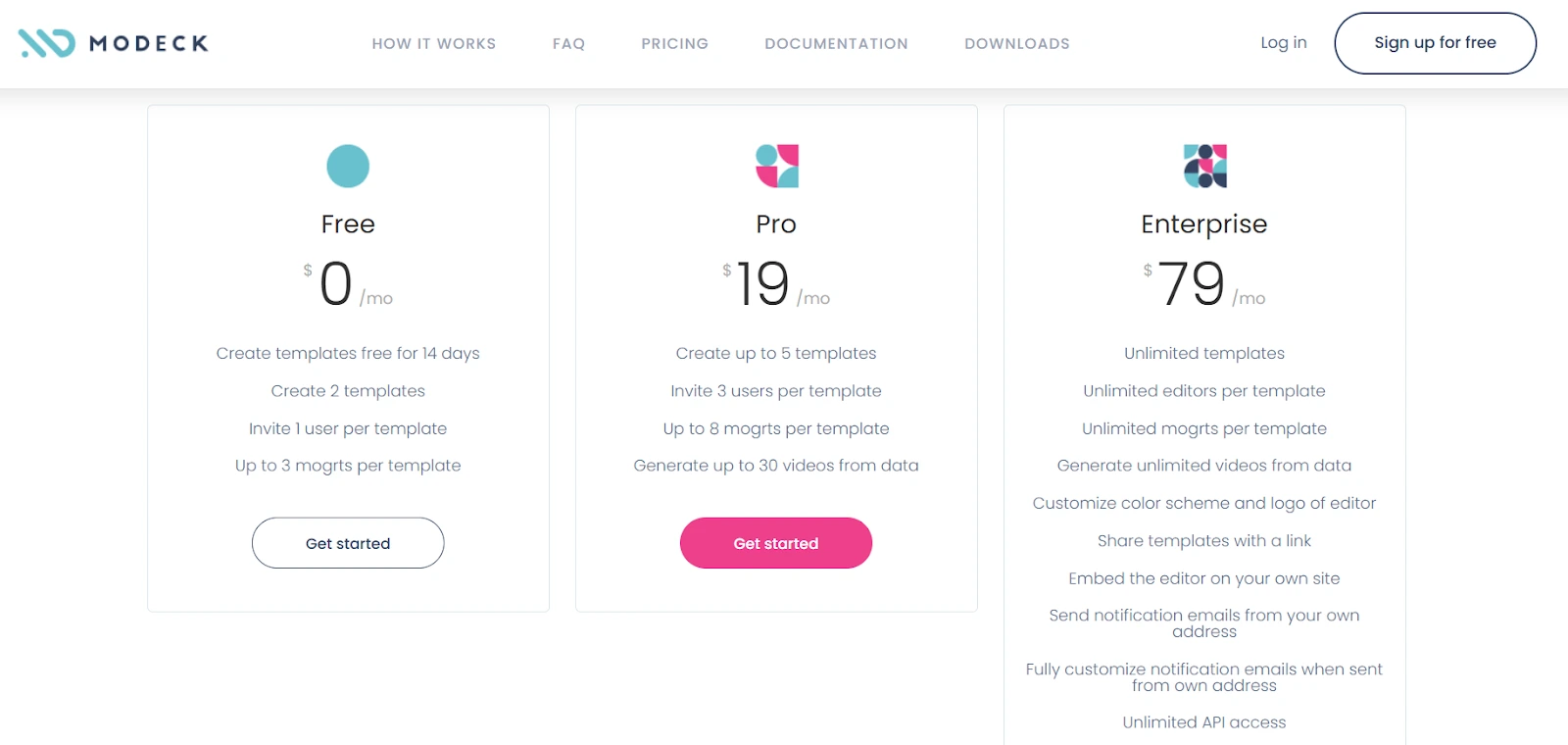
MoDeck uses a relatively simple pricing model, with two subscription tiers available through Aescripts, which is the marketplace where the software is distributed.
Each license is tied to a single user, and you can choose between monthly or annual billing depending on how you want to pay.
There’s also a free plan that lets you test the platform before committing.
Once the trial ends, you can choose between two paid plans:
- Pro at $19/month. It allows you to create up to 5 templates, invite 3 users per template, and use up to 8 MOGRTs per template. It also lets you generate up to 30 videos from data.
- Enterprise at $79/month. It includes unlimited templates, unlimited editors per template, unlimited MOGRTs, and the ability to generate unlimited videos from data. It also adds features like customizing the editor’s branding, sharing templates via link, embedding the editor on your own website, and full API access.
MoDeck customer reviews
This is where we’d normally gather feedback from various platforms and forums to see what real users are saying about the tool.
Unfortunately, after quite extensive digging, we couldn’t find any MoDeck reviews whatsoever. Because of that, the best insight we can share here comes from our own experience testing the platform.
From what we’ve seen, MoDeck does a solid job at what it’s primarily built for: letting motion designers create After Effects templates and allowing non-technical teammates to generate video variations without using AE themselves.
At the same time, some of the limitations we covered earlier do become noticeable during real use. The reliance on local rendering, the fairly basic template editor, and the lack of integrations can make the platform feel somewhat limited when it comes to larger automation workflows.
Best MoDeck alternative: Plainly Videos
MoDeck is by no means a bad tool. It’s just… an incomplete tool, if we can put it that way.
There is, however, an alternative that picks up where MoDeck leaves off: Plainly Videos.
Plainly is a video automation platform built around Adobe After Effects templates, but designed specifically for large-scale video generation. Instead of relying on local machines to render videos, it runs on cloud infrastructure and allows teams to automate the entire process.
In practice, this means teams can connect AE templates to different data sources and automatically generate huge batches of videos without manually rendering each one. This is commonly used for rendering personalized video campaigns, dynamic product videos, localized content for multiple markets, automated social media videos, or pretty much any workflow where 100s or even 1000s of video versions need to be created.
That said, let’s take a closer look at where Plainly stands out compared to MoDeck.
Why Plainly Videos is superior to MoDeck
Advanced After Effects compatibility
Both MoDeck and Plainly rely on After Effects templates as the foundation of their workflows.
With MoDeck, motion designers prepare templates inside AE and export them as MOGRT files, which are then uploaded to the platform. From there, non-technical users can modify the dynamic elements that were marked in the template and generate new video versions.
Plainly works in a very similar way in that it also uses AE projects as the base for video automation. Designers can create templates directly in AE and mark dynamic elements such as text, images, footage, colors, and/or audio that they wish to change.
Where the two platforms start to differ is in how those templates are connected to data.
MoDeck relies on CSV and JSON for generating multiple video versions. Plainly, on the other hand, pulls data from a wider range of sources, including csv, Google Sheets, Airtable, and Zapier. This makes it more versatile and easier to integrate into automated workflows.
Cloud rendering infrastructure
One of the biggest differences between Plainly and MoDeck comes down to how videos are rendered.
As we covered earlier in this MoDeck review, MoDeck relies on local rendering. In other words, the machine running the MoDeck desktop app becomes the rendering server. Every time someone generates a video, that request gets sent back to that computer where After Effects and Adobe Media Encoder handle the render.
Plainly, on the other hand, doesn’t rely on a local machine. Instead, it renders video in the cloud from start ot finish. Once a template is set up, videos can be generated automatically without needing a dedicated computer running in the background.
This makes a noticeable difference when projects start scaling. Since rendering happens on a cloud infrastructure, teams can generate large batches of videos simultaneously instead of processing them one by one on a single machine, which saves time immensely.
It also removes some of the operational overhead that comes with local setups. There’s no need to keep a computer running 24/7, manage disk space, or troubleshoot background instances of After Effects or Media Encoder.
Layer scripting and template logic
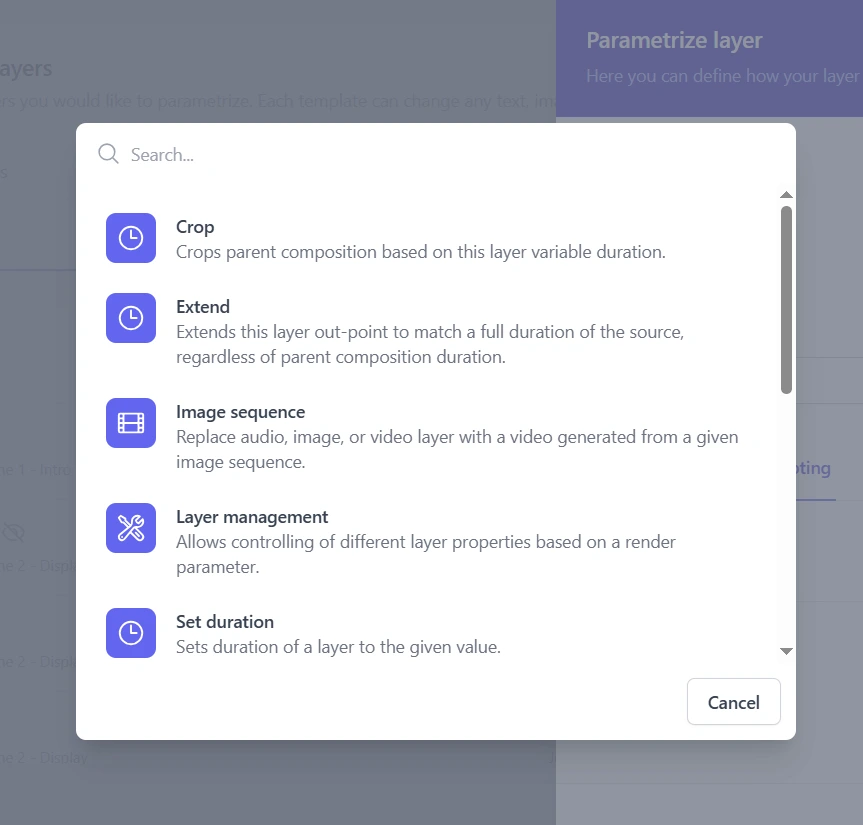
Plainly gives designers more control over how templates behave once data is applied.
Templates can include logic that adjusts layers, timing, and layout dynamically during rendering. As a result, elements can reposition automatically, timing can shift based on the length of a scene, and certain layers can appear or disappear depending on the input data.
In other words, the template and the incoming data can adapt to each other, rather than forcing the template to handle every possible scenario in advance.
Complete web app and API parity
Both the web app and Plainly API are built around the same capabilities, meaning anything you can configure through the Plainly interface can also be controlled programmatically through the API.
This makes it much easier to move from manual workflows to fully automated ones. You can start by generating videos through the web app and later connect the same templates to your own systems without having to rebuild the workflow.
With MoDeck, the situation is a bit different. As mentioned earlier, its API mainly exposes a few core endpoints for simple workflows. More advanced workflows often require additional custom development to bridge the gaps.
Because of that, Plainly tends to be easier to integrate into larger automation pipelines where video generation needs to be triggered automatically from other tools or systems.
Broader integrations & workflow support
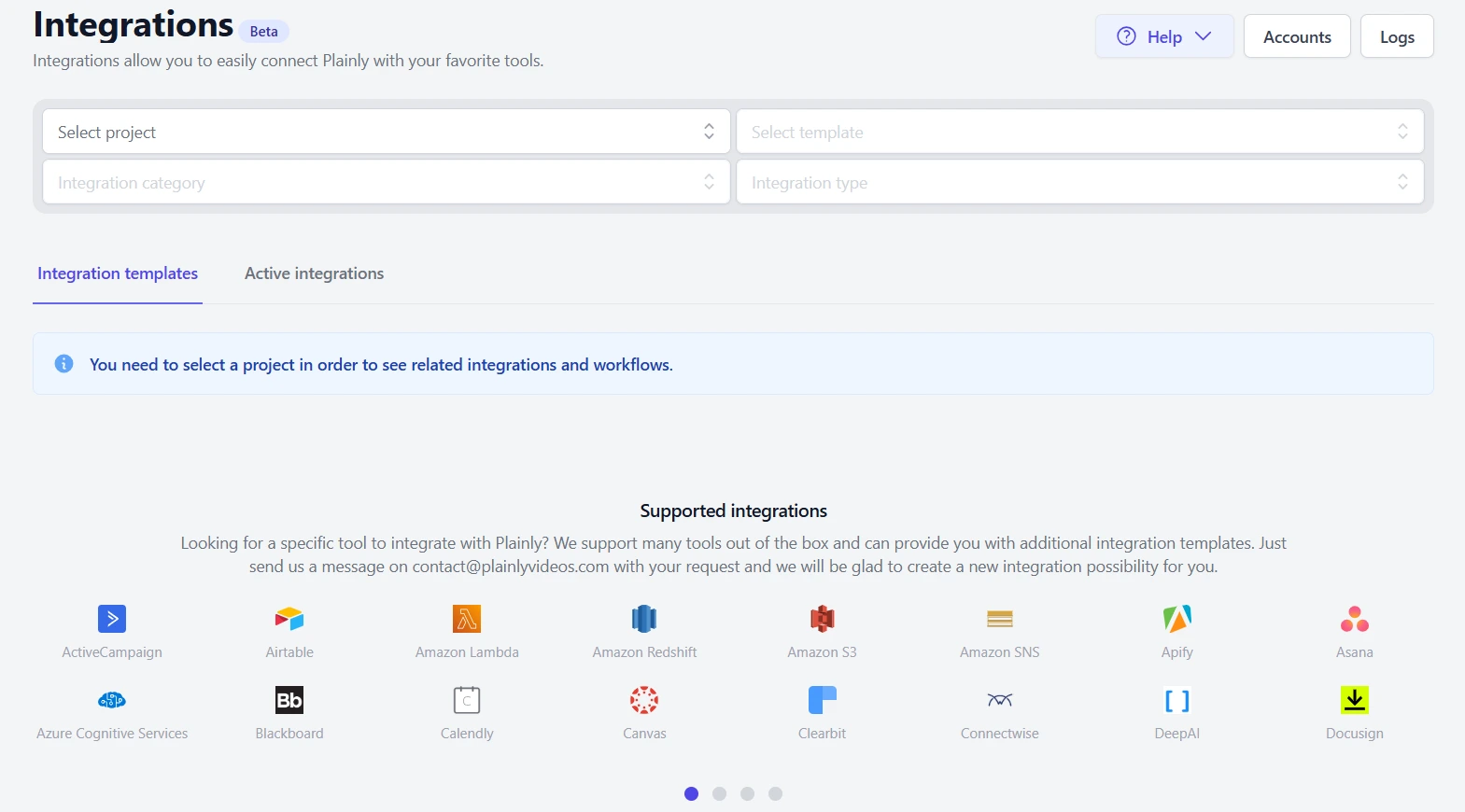
Contrary to MoDeck, Plainly integrates natively with 20+ tools, including Google Drive, Dropbox, Airtable, Frame.io, and more. As a result, you can create different workflows without relying on custom-built integrations.
Focus on high-scale & enterprise use-cases
Plainly is built for scale, meaning teams can generate large volumes of videos automatically without worrying about rendering infrastructure or operational bottlenecks.
On top of that, the software is 100% GDPR compliant and ISO 27001 certified, thus providing enterprise-grade protection for user data.
Dedicated support
Plainly constantly gets praise for the high quality of its customer support, which includes hands-on onboarding, help with setting up templates and workflows, and direct technical guidance when integrating the platform into larger automation ecosystems.
To see what else users have to say about the customer support and the tool itself, check out this G2 page.
Plainly Pricing
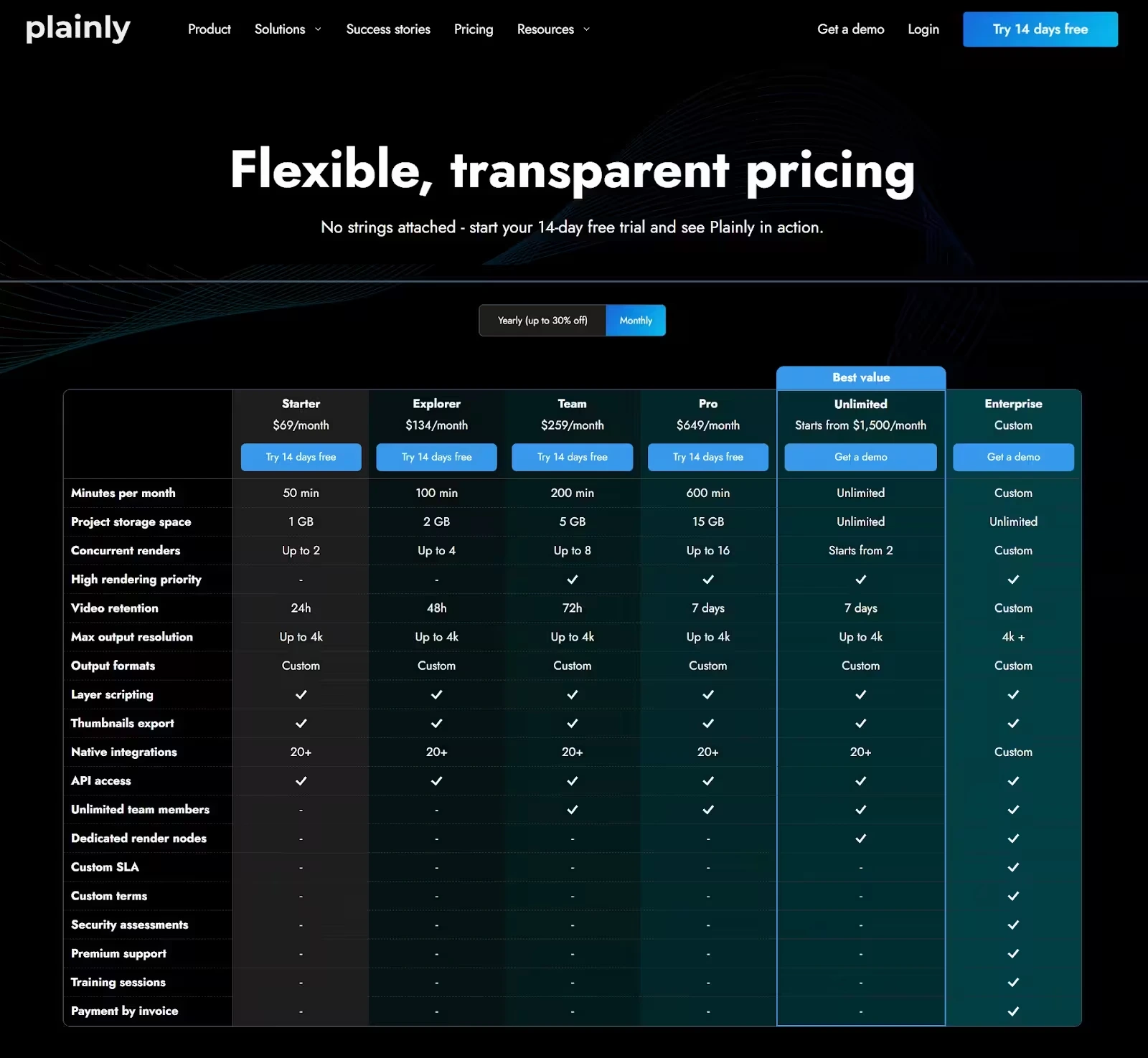
Plainly uses a pay-per-render pricing model and offers a total of six plans.
Every plan includes full platform access, meaning you get integrations, API usage, thumbnail exports, and all core functionality regardless of the plan you choose.
The main difference between plans comes down to how many render minutes you need.
The entry point is the Starter plan at $69/month, which includes 50 render minutes. This is usually enough for running smaller automation projects before scaling things up.
Depending on their rendering needs, users can then move up to:
- Explorer at $134/month (100 render minutes)
- Team at $259/month (200 render minutes)
- Pro at $649/month (600 render minutes)
For companies generating large volumes of video, there’s also the Unlimited plan starting at $1,500/month, which removes rendering limits and increases concurrency so multiple videos can be rendered simultaneously.
Finally, there’s a custom Enterprise tier for organizations that require dedicated infrastructure, service level agreements (SLAs), and advanced security options, among others.
Is MoDeck worth it or not?
That depends on what exactly you need it for.
From what we’ve seen while testing it, MoDeck can be a good fit for smaller teams that already work in After Effects and want a simple way to let non-technical teammates create video variations. If your workflow is fairly straightforward and you don’t mind relying on local rendering, it can get the job done.
That said, this MoDeck review also made it clear that the platform comes with a few limitations. The basic template editor, lack of native integrations, limited data-source flexibility, and reliance on a local machine for rendering can all become bottlenecks once you want to scale video production.
If, on the other hand, you need a video automation platform built for scale, then Plainly is the stronger option. It gives you the same After Effects foundation, but with cloud rendering, broader integrations, more advanced template logic, stronger API support, and infrastructure that’s much better suited for generating 100s of videos.
So, is MoDeck worth it?
For smaller, more contained workflows - yes, it can be.
But if you’re looking for a platform that can support more advanced automation and grow with your needs, Plainly is the better fit.
Start a free trial or book a demo today to experience the full power of After Effects automation.



