
How to make personalized hotel promo videos [Complete Guide]


Summarize with





You know that sweeping drone shot of the pool at sunset, the slow pan across the lobby, the staff member at the door? Every hotel has that video. And because every hotel has it, it stops registering with the people who see it. Travelers scroll past generic property reels the same way they scroll past banner ads, quickly and without a second thought. If you want someone to actually stop, watch, and book, you need to show them something that feels like it was made for them.
That's where personalized hotel video marketing comes in. Instead of broadcasting one video to everyone, you produce variations that speak to a specific guest, offer, or moment. A returning guest sees their name and a room upgrade offer. A corporate travel planner sees meeting-room footage and group pricing. A couple who browsed a beachfront suite gets a video built around that exact room and their check-in dates. Personalized video content achieves conversion rates 3x higher than non-personalized equivalents, and when you combine that lift with the format guests already prefer, the results get hard to ignore.
This guide will walk you through exactly how to make personalized hotel promo videos, from concept to distribution. You'll learn what personalized videos actually are in a hotel context, why they outperform generic content, and the complete step-by-step workflow for creating them at scale using After Effects and Plainly Videos.
What are personalized hotel promo videos?
A personalized hotel promo video starts with a single, professionally designed video template and then swaps specific elements based on guest data or campaign details to produce unique versions automatically. Think of it as one video that shapeshifts depending on who's watching.
The "personalized" part comes from combining a dynamic video template with structured data, like a spreadsheet full of guest names, booking details, or campaign variables. Each row of data produces one video variation, and video automation handles the rendering so you're not manually editing hundreds of files.
Here are a couple of examples of what can actually change between video versions in a hotel context.
- Guest name - displayed as a text overlay in the opening or throughout the video
- Room type or category - showing the exact suite, deluxe room, or villa the guest booked or browsed
- Offer or discount - a specific promo code, percentage off, or package deal
- Check-in and check-out dates - making the video feel tied to their upcoming trip
- Destination imagery - swapping city skyline footage for beachfront clips depending on the property
- Loyalty tier - referencing Gold, Platinum, or VIP status with tier-specific perks
- Language - producing the same video in English, Spanish, French, or any language your guests speak
- Campaign segment - different messaging for leisure travelers vs. corporate bookers vs. wedding groups
The difference between a standard hotel promo video and a data-driven one is simple. A standard video gets filmed once and broadcast to everyone. The same 30 seconds play whether the viewer is a solo business traveler in Frankfurt or a family planning a beach holiday in Cancún. A personalized version changes based on who's receiving it, so each viewer gets content that reflects their situation, their preferences, or the specific offer that's relevant to them.
Why personalized hotel promo videos work
Generic video performs well compared to text and static images. Personalized video performs better because it matches the viewer's context, so each message feels relevant enough to watch.
Personalized videos generate 16 times higher click-to-open rates and 4.5 times more click-throughs than generic video content, according to Vidyard. For hotels, the average website conversion rate sits below 2%, meaning out of every 100 visitors, fewer than two book directly. The rest leave and book elsewhere, often through OTAs. Personalization addresses that problem directly.
The "why" behind these numbers comes down to a few things.
Relevance beats reach. A guest who gets a video mentioning their name, their upcoming stay dates, and a package that matches their past booking history will pay attention in a way they never would to a "Visit us this summer!" blast.
Guests respond to specificity. Offers tied to actual stay dates, room preferences, or past behavior outperform blanket promotions. A returning guest seeing "Welcome back, Sarah, your oceanview suite is waiting" carries more weight than "Book now and save."
Reduced ad spend waste. Instead of running one generic creative to a broad audience and hoping some percentage cares, you can target the right message to the right segment.
Video is already the highest-performing format. 82% of marketers say video marketing has given them a good ROI. Together, they tend to perform better than either would on its own.
Examples of hotel promo videos
Personalization applies across the full guest journey, not just acquisition. From the first ad a potential guest sees to the win-back email six months after checkout, there's an opportunity to make every touchpoint feel specific and relevant.
Here's how different personalized video types map across the guest lifecycle.
Dynamic video ads are the most visible use case. Instead of running the same 15-second ad to everyone on Meta or YouTube, you produce variations by destination, room type, or traveler segment, so a couple browsing luxury beach resorts and a solo business traveler see completely different creatives built from the same template.
Booking confirmation videos replace the flat transactional email with a short branded video that shows the guest their room, the property amenities, and their stay dates.
Pre-arrival upgrade offers land a few days before check-in with a personalized pitch. The video shows the guest's current room alongside the upgrade option, a specific price, and a one-click CTA to say yes.
Win-back campaigns target guests who haven't booked in 6 to 12 months. The video references their last stay, acknowledges their loyalty tier, and presents a new offer designed to bring them back.
Corporate booking videos are especially useful for sales teams pitching group business. A video that includes the company's name, the proposed meeting space, and customized rates feels far more polished than a static PDF proposal.
What you need to create personalized hotel promo videos
Before jumping into the step-by-step process, here's a short checklist of everything you'll need.
One base video template. It's your master video, built once to swap in dynamic elements per recipient. It contains all the fixed visual elements (property footage, branding, music, animations) alongside placeholders for the parts that will change.
Personalization variables (your data). These are the data points that change between each video version. Guest name, offer headline, check-in date, room type, and anything that changes for each client. This data is typically in a spreadsheet or comes directly from your hotel CRM, PMS, or booking system.
A video automation platform. This is the tool that connects your template to your data and renders all the variations automatically. A good video automation platform handles everything from template configuration to cloud rendering and final delivery, connecting your template to the hundreds (or thousands) of unique videos you need to produce.
A distribution channel. Once the videos are rendered, they need to reach your guests. Common channels for hotel promo videos include email (pre-arrival sequences, post-stay follow-ups), direct booking confirmation flows, social media ads (Meta, YouTube, TikTok), WhatsApp or SMS, and hotel CRM sequences.
With these four pieces in place, you're ready to build.
Step-by-step guide on how to make personalized hotel promo videos
This guide uses two tools throughout. Adobe After Effects for building the base template (it's the industry standard for motion design and gives you full control over visuals and animation), and Plainly Videos for connecting your data, automating rendering, and getting the finished videos out the door.
You don't need to be an After Effects expert to use this workflow. If you have an in-house motion designer or video editor, they can build the template. If you don't, this is the one step worth outsourcing to a freelance motion designer or creative agency. The template only needs to be built once, so it's a one-time investment that pays off every time you run a new campaign.
Create your base video template
Open After Effects and build your hotel promo video the way you normally would. Set up the layout, add your property footage, place your logo, drop in music, and design the animations and transitions.
Then decide which elements will change between video versions. These become your dynamic layers. To mark them, add a consistent prefix to the layer name. For example, if your prefix is dynamic, a text layer for the guest name becomes dynamicGuestName. A layer for the room photo becomes dynamicRoomImage. The prefix can be any word you choose. It just needs to be consistent across all dynamic layers.
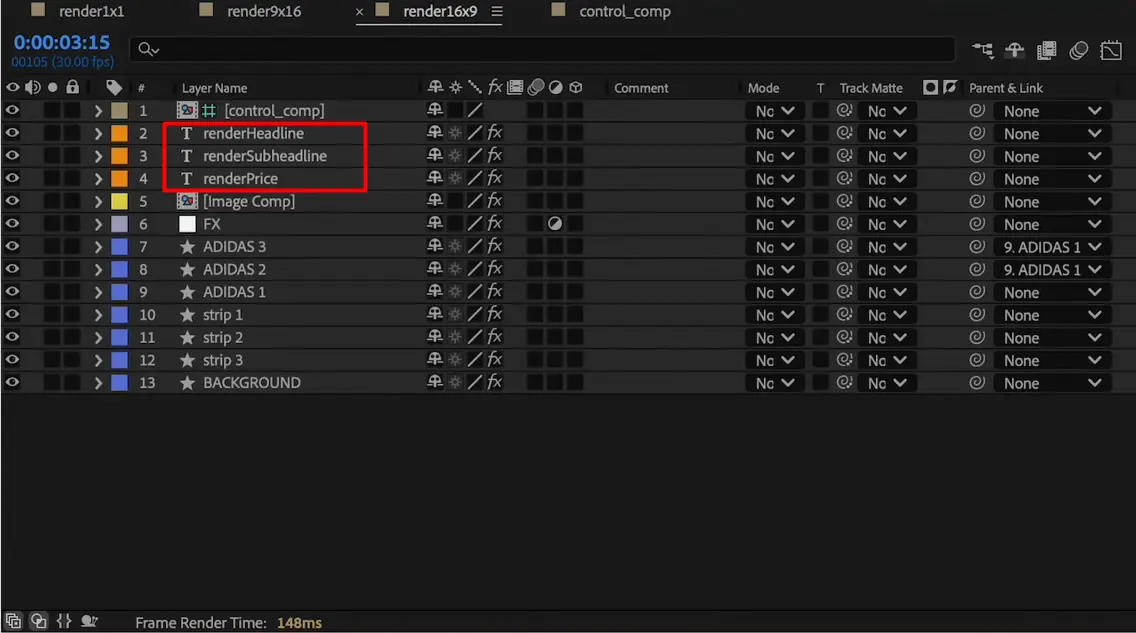
In a hotel context, here's what typically gets made dynamic.
- Text fields - guest name, offer headline, room type, check-in date, price, loyalty tier
- Images - room photos, destination imagery, property-specific logos
- Video clips - b-roll of specific properties, pool or spa footage, city scenery
- Colors - brand accent colors for different hotel chains or sub-brands
- Audio or voiceover files - language-specific narration or background music
Keep the rest of the template fixed. Your layout, transitions, and animation timings stay the same across every version. Only the elements that need to change should be dynamic.
When the template is finished, zip the entire After Effects project folder, including the .aep file and all linked assets. That zip file is what you'll upload in the next step.
Upload your video template to Plainly Videos
Go to the Plainly dashboard and click Upload Project. Give your project a name and upload the .zip file you just created.

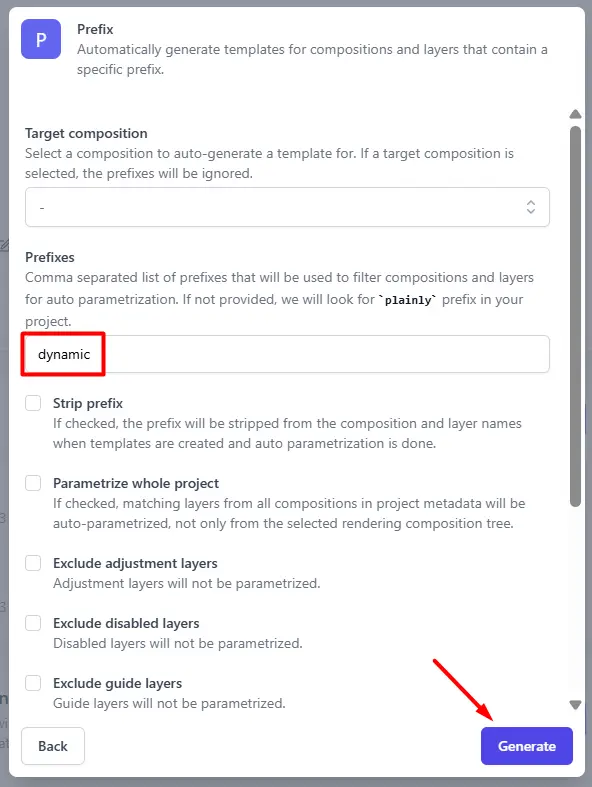
Once the upload finishes, create a template from the project. Click Auto-generate, select the Prefix option, enter the prefix you used in After Effects (e.g., dynamic), and click Generate. Plainly scans the project and automatically tags every matching layer as dynamic.
Open Parametrize Layers to review every detected dynamic element, organized by type (text, image, video, audio, color). Adjust layers manually as needed, and use Layer Scripting for advanced rules like cropping, extending, or shifting individual layers.

Upload your data
If you don't want to build the CSV from scratch, Plainly has a Generate example CSV feature. It creates a pre-formatted CSV based on your template's dynamic layers, so you know exactly which columns to fill in and what format they expect.

Just populate the rows with your guest data. You can also create your own CSV if you want, but just remember to name the columns the same as your dynamic layers, because in the next step, it will make things easier for you.
Here's what a CSV for a pre-arrival upgrade campaign might look like.
While this guide uses CSV for simplicity, Plainly also supports Google Sheets, Microsoft Excel, and Airtable as live data connections via the Integrations tab. The data structure is identical regardless of source: columns equal dynamic layer names, rows equal individual videos. It's the same spreadsheet-to-video concept, just with different connection methods.
Start creating your videos in bulk
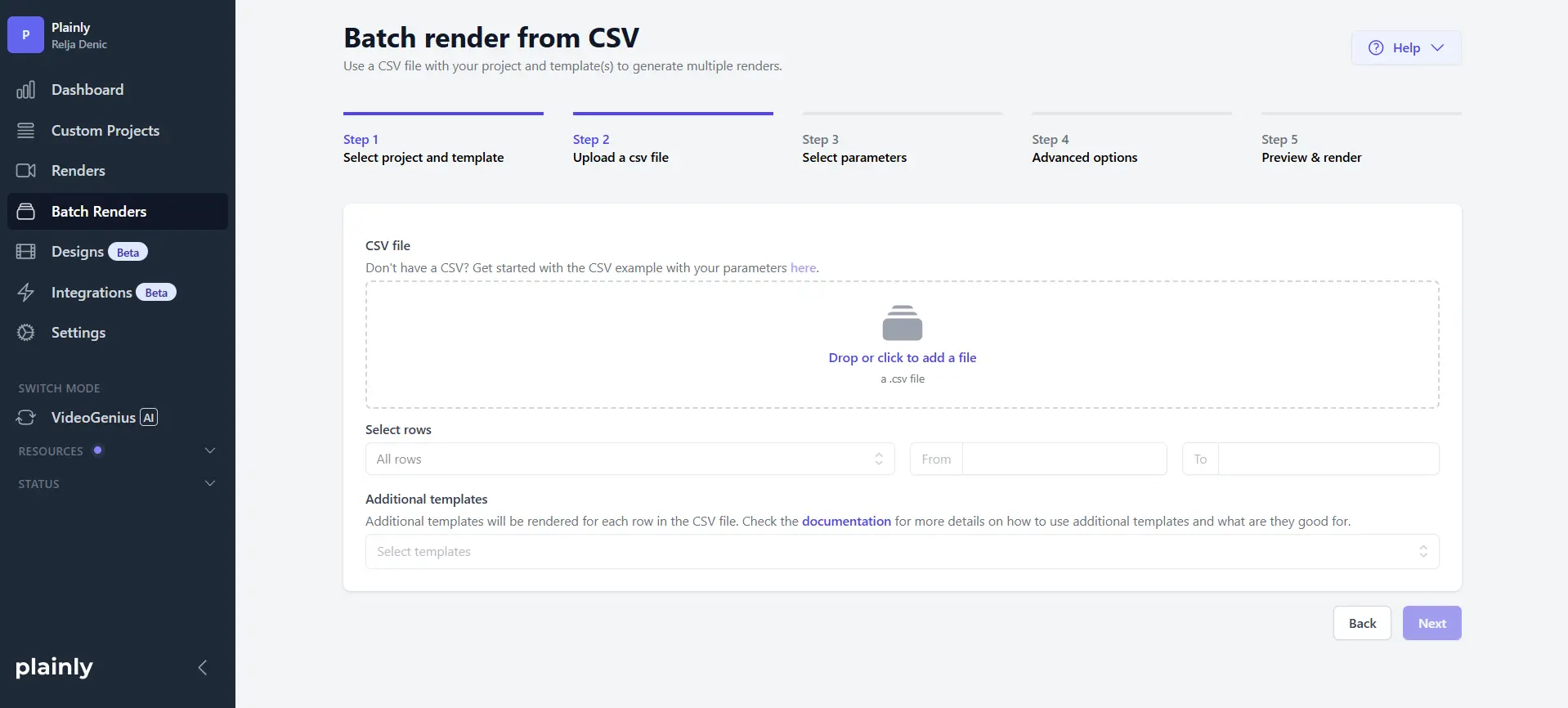
Go to Batch Renders in Plainly and click New batch from CSV.
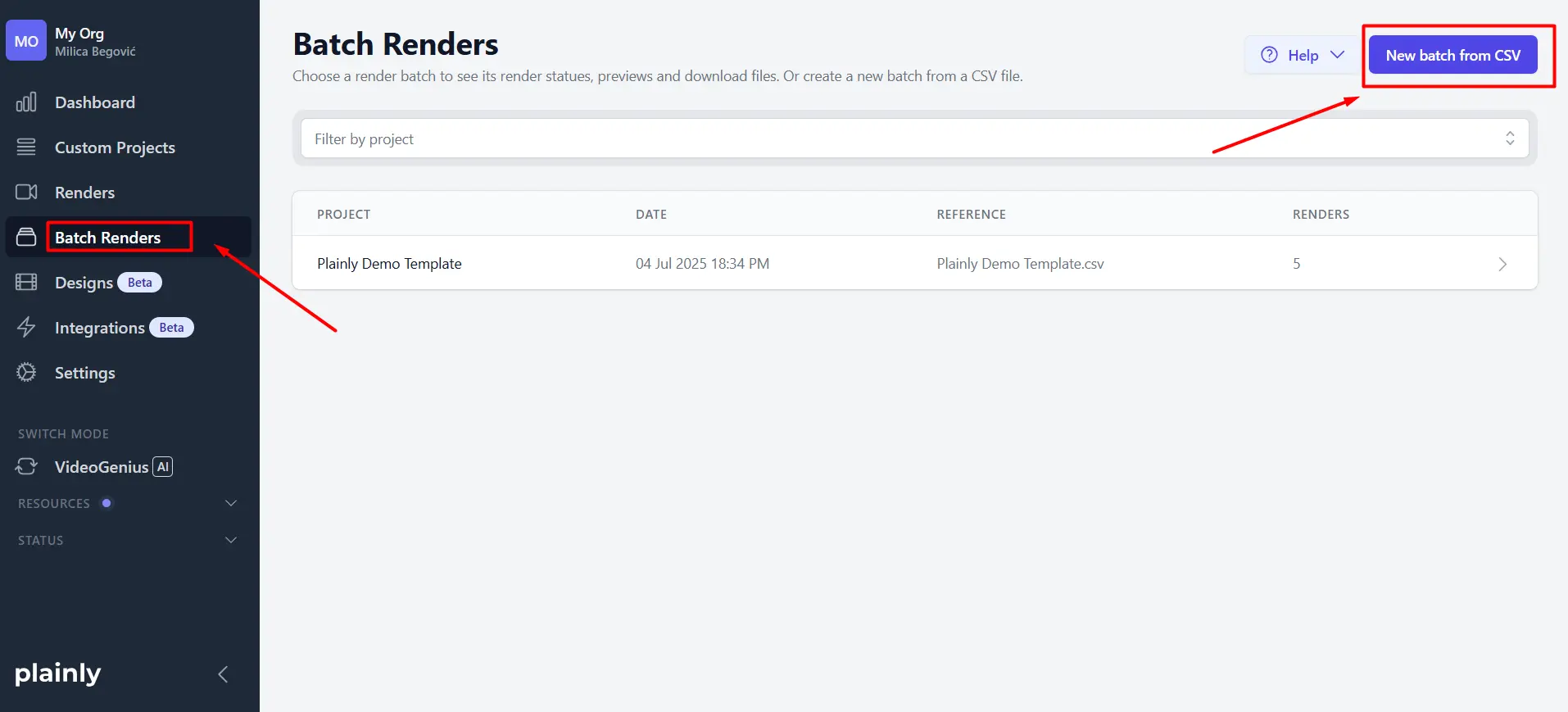
Upload your CSV file, and Plainly will ask you to map each column to its corresponding dynamic layer in the template. If your column names match the layer names exactly (which they will if you used the Generate example CSV feature or followed the naming convention), click Auto-link and everything maps automatically.
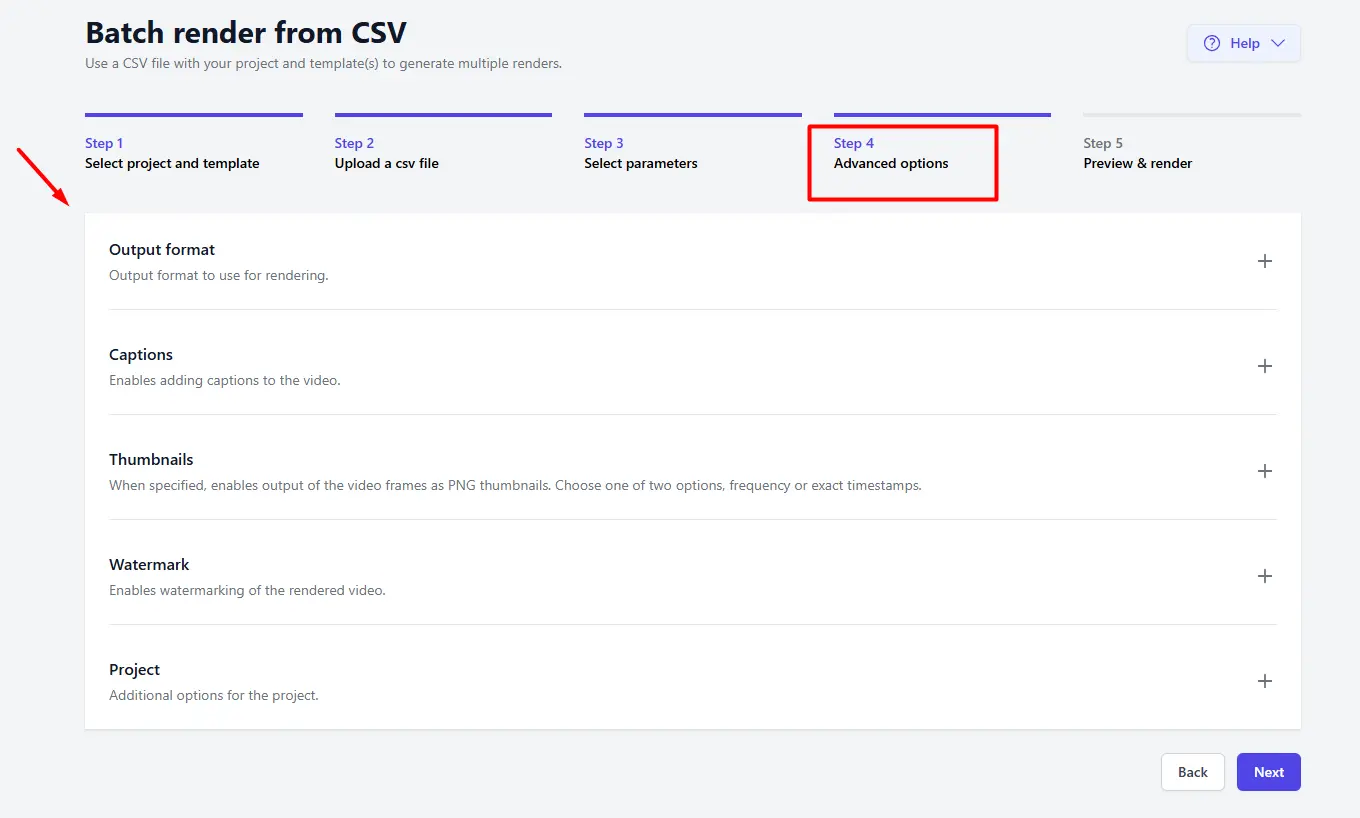
Configure any optional settings you need, like captions, thumbnails, output format, or watermarks. Then start the render.
Here's where the workflow really pays off. Plainly handles all rendering in the cloud, so you don't need After Effects running on your machine, and you don't need powerful local hardware. Your laptop can be closed while thousands of videos render on Plainly's servers. Ten rows in the CSV produce 10 videos. Five hundred rows produce 500 videos. The effort and time investment from you is the same. This is how you scale video production without scaling your team or your budget proportionally.
For teams that want an even more automated workflow, Plainly's live integration option lets you connect a Google Sheet or Airtable base directly. Every time someone adds a new row (say, when a new booking comes in or a CRM export runs), a new video renders automatically without anyone clicking a button.
Download and distribute your videos
Once rendering is complete, you have three main paths to get videos where they need to go, ranging from simplest to most automated.
Manual download. For small batches or one-off campaigns, you can download videos individually or grab the full batch as a .zip file. Quick, no setup required.
Native integrations. Plainly connects to Google Drive, Dropbox, Frame.io, YouTube, and 20+ other tools for team workflows, review processes, and publishing. If your marketing team uses Frame.io for approvals or Google Drive for shared asset libraries, rendered videos can land there automatically. This works well as a bulk video editor workflow where you need to create, review, and approve large batches before distribution.
API delivery. For fully automated pipelines, Plainly's API can push rendered videos directly into your hotel CRM, email platform, booking confirmation system, or any custom integration. This is the path for hotels that want personalized videos delivered to guests without any manual step after the initial setup.
The full workflow, from template to distributed videos, can run without you touching a single video file manually after the initial setup.
Your next move with personalized promo hotel videos
Here's where things stand. Generic hotel promo videos blend into the noise. Personalized ones cut through it because they speak to a specific guest, a specific offer, or a specific moment in the booking journey. The workflow to create them requires one After Effects template, a spreadsheet of guest or campaign data, and a tool like Plainly Videos to connect the two and handle rendering at any scale. You've now seen how to make personalized hotel promo videos end to end, from building your dynamic template and uploading it, to preparing your data, batch rendering hundreds of variations, and distributing them through email, ads, or direct CRM delivery.
The process is repeatable. Build the template once, swap the data as often as you need, and every campaign gets a fresh set of personalized videos without starting from scratch. Whether you're running pre-arrival upsell campaigns, corporate proposals, or win-back sequences, the same workflow applies.
The only thing left is to start. Sign up for Plainly Videos, upload your first template, and see how quickly a spreadsheet of guest data turns into a batch of videos that actually convert. Your pool-at-sunset reel had a good run. Time to give your guests something worth watching.



