What is a personalized video and how does it work? [Complete guide]


Summarize with





A personalized video is a video created or adapted for a specific viewer using details like their first name, company, interests, behavior, or stage in the customer journey. Instead of sending the same generic video to everyone, you can tailor parts of the message so the viewer feels like the video was made specifically for them.
It turns out, going that extra mile matters a lot to viewers. McKinsey found that 71% of consumers expect companies to deliver personalized interactions, and 76% get frustrated when that doesn’t happen. Personalized video brings that same expectation into a format people already find easy to consume.
And that’s really where personalized video gets interesting: it can feel one-to-one without always requiring one-to-one video production, which is what’s so great about it, right?
In this guide, we’ll break down how personalized video works, where it fits into sales and marketing, and the main benefits of personalized video. We’ll also look at practical use cases and the tools you can use to create and send personalized videos at scale.
What is a personalized video?
Let’s expand on this a little bit. Video personalization means changing parts of a video based on who’s watching it. Sometimes that change is small and simple, like adding the recipient’s name to the opening frame. Other times, the entire message can adapt based on their company, location, purchase history, behavior, or where they are in the sales process.
The easiest way to think about it is this: with a regular video, everyone sees the same thing. However, with a personalized video, certain elements are swapped, generated, or selected using customer data so the final version feels more relevant to that specific person.
Those elements can include:
- Text: names, company names, job titles, account details, offers, CTA, or other dynamic copy shown inside the video.
- Visuals: logos, product images, screenshots, backgrounds, or graphics that match the viewer or account.
- Audio and voice: a person’s name, company, or other details can be inserted into a voiceover, while AI video tools can now generate larger portions of the spoken message dynamically.
- Scenes and content: different viewers can see different sections of the video depending on their interests, customer segment, or actions they have already taken.
- Thumbnail: even the video thumbnail can be personalized with a name, company logo, or relevant image to make the video feel tailored before someone presses play.
Now, not every personalized video needs all of these elements. A salesperson can simply hit record and make a one-to-one personal video for a prospect. On the other end of the spectrum, a company can use a video platform, CRM, and marketing automation to generate personalized videos for every customer from a single template. Now that’s how you nail your personalized video marketing campaign.
That distinction is important. Personalization doesn’t necessarily mean creating every video from scratch. In many cases, the core footage stays the same while specific pieces change automatically. You might have one video template, for example, but generate hundreds or thousands of versions with different names, offers, product recommendations, or account-specific visuals.
So, when we say a video is personalized, we are really talking about relevance. The more closely the content reflects what you know about the viewer and what they need at that moment, the more personalized the experience becomes.
Why personalized videos work
It’s simple. Personalized video works because the viewer doesn’t have to search for a reason to care. Their name, their data, their progress, or something else they recognize tells them almost immediately: this is for me.
The “cocktail party” effect
Ever heard your name across a noisy room even though you weren’t listening to that conversation? That’s the cocktail party effect: our brains are unusually good at picking up personally relevant information.
In one replication of the effect, 29% of participants noticed their own name in an audio stream they had been told to ignore, while unexpected words were rarely detected.
So, personalized video uses that same principle. A name in the opening frame, a familiar company logo, or the viewer’s own product can interrupt the stream of generic content and earn attention before the actual message even begins.
The self-reference effect
We also remember information better when we can connect it to ourselves. Psychologists call this the self-reference effect, and a large meta-analysis found that information processed in relation to the self is remembered better than information processed only for its general meaning. That’s why useful personalization goes beyond adding someone’s first name.
UNICEF Australia, for example, created 20,000 personalized donor videos showing each donor the projects they supported, badges they earned, and their individual impact. The campaign was followed by an 8% increase in donations.
The video gives the viewer something concrete to connect with: my contribution, my result, my impact.
Identity expression
Sometimes a personalized video becomes something people want to share because it says something about who they are.
Run Malibu is a good example. Augment Agency used Plainly Videos to generate 5,000+ personalized recap videos showing each runner’s pace, position, finish time, and other race data. Participants then shared those videos across social media.
The appeal wasn’t simply that the video contained personalized data, but the fact that it documented an achievement that was part of the runner’s identity. That makes formats such as race recaps, milestones, anniversaries, awards, and year-in-review videos particularly shareable: people aren’t just sharing brand content. They’re sharing something about themselves.
Felling seen
There’s a difference between a company having your data and actually using it to make your experience better.
Good personalization acknowledges what someone bought, designed, achieved, donated, or needs next. Research supports this too: a 2025 meta-analysis of 53 experimental studies found that personalized advertising was generally more persuasive than generic advertising, with perceived relevance helping explain why.
For example, Tapni applied that idea to abandoned carts. Instead of sending a generic reminder, it showed customers a personalized video featuring the exact business card they had designed, complete with their branding, colors, and layout. The campaign increased conversions from abandoned sessions by more than 10%. The customer wasn’t looking at a product. They were looking at their product.
Zero translation work
Generic content often makes the viewer do the final bit of work themselves: Which option applies to me? What would this look like for my company? Which of these results actually matter to me? A personalized video answers those questions before they need to be asked.
Instead of explaining what a customer could achieve, it can show what this customer achieved. Instead of showing a sample product, it can show the one they configured. Instead of running through every onboarding feature, it can explain the ones relevant to their plan.
That’s ultimately why personalized video can feel so effortless to watch: the viewer spends less time translating a generic message into their own situation and more time paying attention to what you actually want to tell them.
What type of data can be used in a personalized video?
Almost any data you have access to can be used to personalize a video, as long as it can be connected to the right viewer. That data might come from your CRM, ecommerce platform, product analytics, signup forms, loyalty program, or another system you already use.
And you don’t need dozens of data points to make personalization work. Sometimes a name and company logo are enough. In other cases, combining several data sources lets you create a far more hyper-personalized experience where the visuals, message, numbers, and CTA all change for the individual viewer, which is our ultimate goal.
Always have this in mind: the key is to use data that makes the video more relevant, not just data you happen to have.
Examples where personalized video can be used
Personalized video can fit into almost any point of the customer journey, from first outreach to retention. The best opportunities are usually moments where context about the viewer can make the message more relevant, useful, or memorable, so keep a lookout for those. Also, here are a few examples we can think of:
- Onboarding: A welcome video can change based on the customer’s plan, selected features, industry, or setup so they only see what is relevant to them.
- Abandoned cart recovery: Instead of sending a generic reminder, brands can show the exact product, configuration, or offer the shopper left behind.
- Post-purchase communication: A personalized video can confirm an order, explain next steps, recommend relevant products, or show customers how to get more value from what they bought.
- Customer milestones: Companies can turn usage data, achievements, anniversaries, or progress into personalized recap videos that recognize each customer individually.
- Events and conferences: Attendees can receive recap videos based on the sessions they joined, speakers they watched, booths they visited, or other event activity.
- Fitness and sports: Performance data such as distance, pace, rankings, personal records, or completed challenges can be turned into customized videos for each participant.
- Donor communication: Nonprofits can show each donor the projects, campaigns, or outcomes their contribution helped support.
- Customer retention: Brands can use personalized videos to celebrate loyalty, highlight value delivered, encourage continued usage, or re-engage customers before churn becomes likely.
- Upselling and renewals: Personalized video can show customers what they already use, where they may be reaching limits, and which upgrade makes the most sense for them.
- Personal occasions: Birthdays, anniversaries, employee recognition, awards, and retirement messages can all become more meaningful when the video is uniquely tailored to the viewer.
- Sales outreach: Sales teams can send a personalized video that mentions the prospect’s name, company, role, or specific challenge instead of relying on the same pitch for every lead.
- Account-based marketing (ABM): Marketing teams can create account-specific videos or dynamic video ads for high-value companies, tailoring the message, visuals, offer, and CTA to each account.
How to make personalized videos
The basic process is simple: decide what should change, build one master version, connect it to your data, generate the variations, and distribute them to the right people. The key is setting up the system once so you can create personalized videos at scale without manually editing every version. Sound simple enough, right? Well, in case it doesn’t, we prepared a walkthrough for each step, so let’s go over the setup together.
Pick data points for personalization
Start by deciding which parts of the video should change from viewer to viewer. This could be a name, company logo, product image, purchase, location, performance stat, CTA, or any other data you have access to.
Choose data because it adds something meaningful to the message, not just because you have it. If a customer’s usage statistics tell a stronger story than their first name, for example, those statistics should do most of the personalization work.
Create your master template
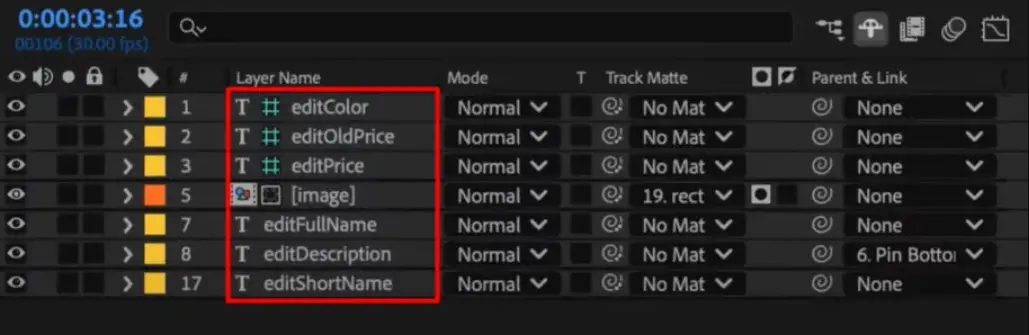
Next, create the master template video and decide which elements should stay fixed and which should change. In Plainly, you can turn text, images, video, colors, and other After Effects layers into dynamic parameters that can accept different values for every viewer. Why After Effect, well, it will give you the most value, and it’s the industry standard, so creating a template in AE can simplify this step and the later steps by default.
You mark the elements that you want to change in Plainly later on, and that’s it. Think of this template as the blueprint: the design, animation, timing, and overall story stay consistent and on-brand, while the personalized elements get filled in later.
Connect your data
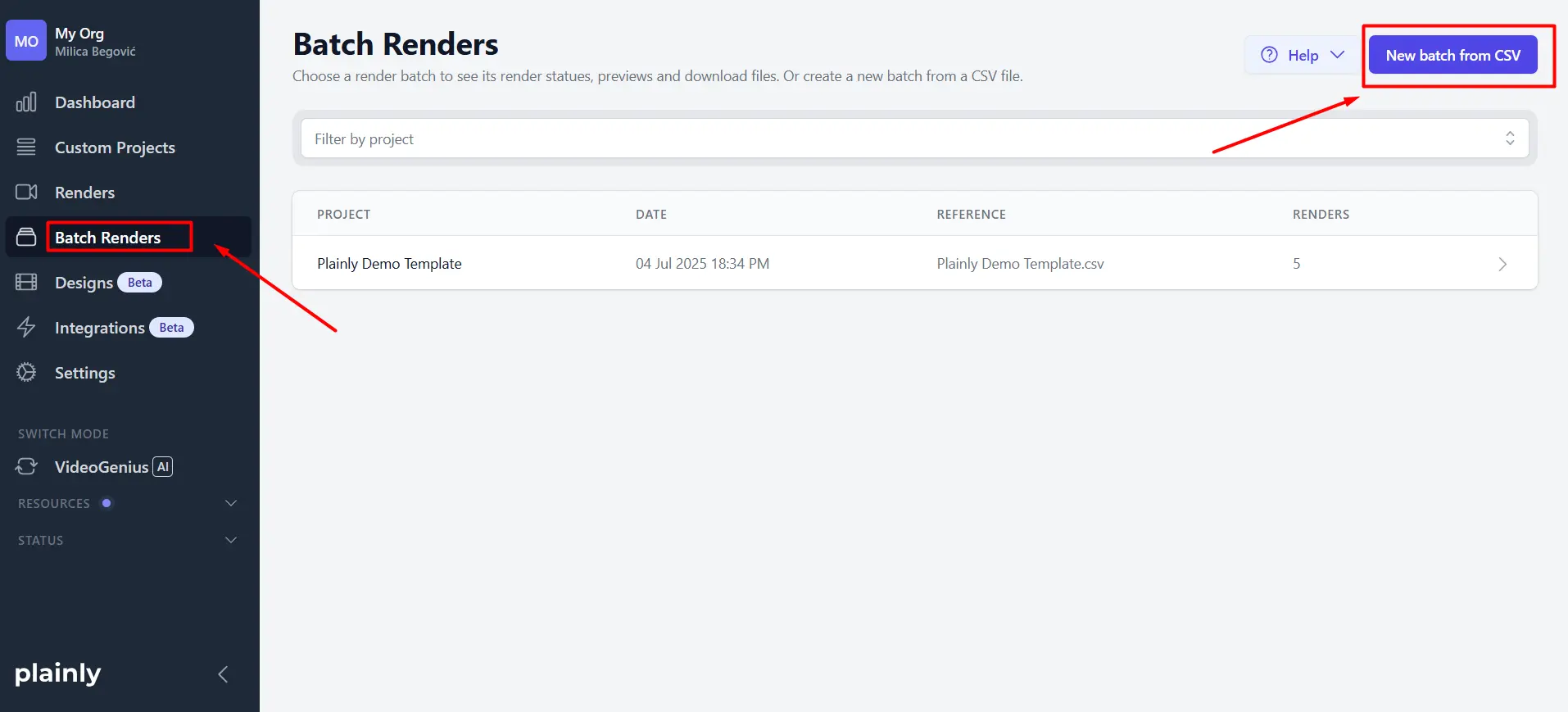
Now that the template is ready, connect the data that will populate those dynamic fields. You can upload a CSV and map each column to the matching parameter, or automate the flow through integrations, Google Sheets, forms, or the Plainly API.
This is where you get to experience the amazing spreadsheet to video workflow, firsthand, and it’s good, trust us.

Batch create your personalized videos
With the template and data connected, you can generate a separate video for every row or record in your dataset, thanks to your bulk video editor. So if you have 1,000 customers, the same setup can produce 1,000 customized versions without manually editing the project 1,000 times.
You can also trigger renders automatically when new data arrives, which makes this especially useful for always-on campaigns, onboarding flows, or other automated customer journeys.
Distribute personalized videos
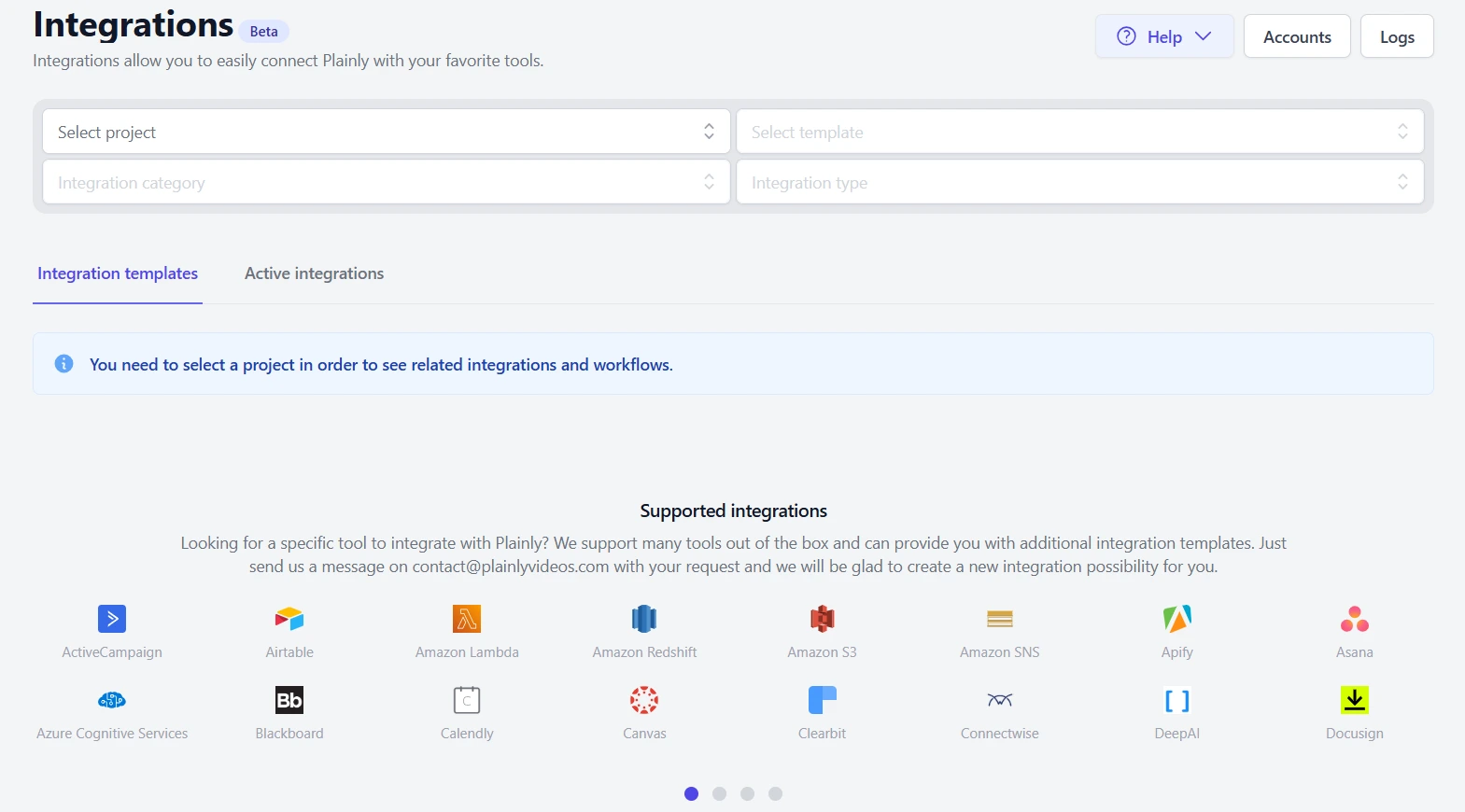
The final step is getting each video to the right person. Finished videos can be sent to cloud storage, passed through integrations or webhooks, or connected to the rest of your campaign workflow. From there, you can use them in a personalized landing page, CRM sequence, video emails, marketing automation flow, or wherever the viewer is most likely to engage with your content.
Turn personalization into a repeatable video workflow
So, to shut down any concert you might have, a personalized video works because it makes the message more relevant to the person watching it. The right data can change everything from names and visuals to offers, performance stats, product details, and CTAs, while a reusable template lets you scale that personalization without rebuilding every video from scratch.
The process is pretty simple to follow to create a system: choose the data that matters, create a master template, connect your data source, generate the individual versions, and distribute them through the channels you already use.
That’s exactly what Plainly is built for. If you want to see a personalized video software turn your existing customer data into personalized videos at scale, book a demo with Plainly and we’ll show you how the workflow can fit your use case. Or you can just sign up and begin right away. Either way, you won’t be disappointed.