
Create event motion graphics from your event data
Create speaker intros, session titles, lower thirds and screen graphics from your event spreadsheet. Keep one consistent design across the event while Plainly handles the repetitive updates and rendering.
You know you often hear business owners say we really just want technology to help us run our business better. Like this is it. This is what you do to run your business better.
Jody Poole, Team Lead Design @ Leads.io




How event graphics automation works
Create your event templates
Design your motion graphics in After Effects and upload them to Plainly. Choose which names, titles, photos, logos and other details will change.
Add your event information
Connect a spreadsheet or upload a CSV with your speaker, session and sponsor details. Match the columns to the elements in each template.
Render your event graphics
Generate your graphics in the cloud and deliver them to your production team. When details change, update the data and render the versions you need again.
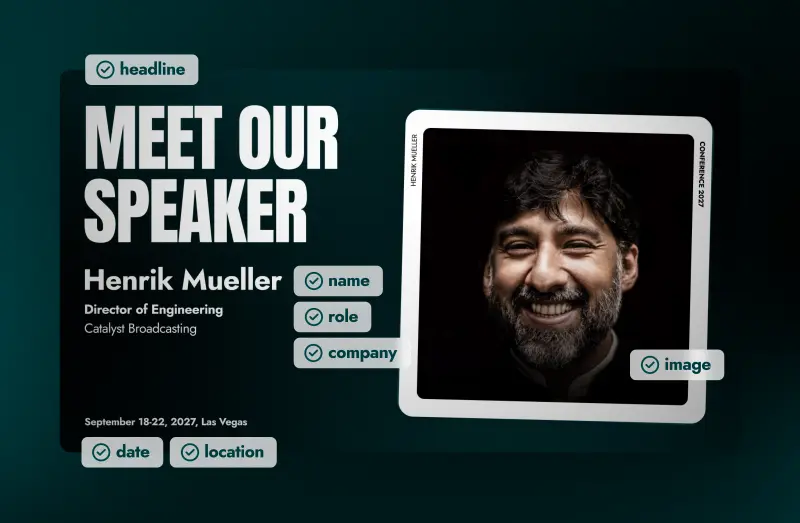
Replace video elements in bulk
Keep up with every speaker, session and last-minute change
Give your production team a repeatable way to create event graphics, with consistent design and fewer manual updates.

One consistent event identity
Use your After Effects templates to keep typography, colors and animation consistent across the event.

Native integrations, no code
Easily connect your data and your favorite tools without writing code.

Output formats
MP4, MOV and GIF, from Full HD to 4K and above.

Layer scripting
Control how layers behave across every video, with crop, resize, and shift.

Generate stills
Extract still frames from each rendered video.

Enterprise security
ISO 27001 certified and GDPR compliant, with SSO.
Connect your event data and render
Upload a CSV, collect speaker details through a form, connect a native integration or send event data through Plainly’s API.
Turn spreadsheet data into finished videos
Map columns to your template's layers and get a video for every row of data.
Turn form submissions into videos
Clients, customers, or team members submit the content, and each response generates a finished video automatically.
Trigger video creation from other tools
Connect Airtable, Google Sheets, HeyGen, and more to generate videos automatically.
Generate videos programmatically
Send data through the REST API and generate video variations directly from your product or backend.

Give your team a workflow they can run themselves
Build the creative workflow once in Plainly Flows, then let teammates or clients generate new versions through a form or table.
More ways teams use Plainly
Automated video versioning
Swap names, prices and images across hundreds of videos while your team stays focused on the creative work.
Video localization
Batch localize your videos, adapting text, assets, and audio to suit different languages and cultures.
Sports videos
Capture the excitement, and create videos for match lineups, game updates, recaps, and exciting moments as they happen!
News videos
Automate video creation using structured data such as RSS feeds, article metadata, and more.
Digital signage
Automate your digital signage video creation to deliver up-to-date, relevant content across multiple displays at all times.
Broadcast content
Dynamically create lower thirds and other on-screen graphics for your broadcast content in no time.
Dynamic video ads
Automatically swap out elements of your ads and create thousands of variations for TV or social media.
Personalized videos
Engage with your customers with videos personalized specifically for them.
Video editing API
Integrate Plainly into your app, or create custom video automation workflows with a powerful rest API.
What others say about us
We have a great experience working with the team and Plainly. They weren’t shy to break the mold and go the extra mile. Personalization in today’s saturated digital landscape is paramount to cut through the noise and stick out; Plainly offers a great platform, product, and solution for this.

CMO, Y11 Sport & Media Holdings
Working with Plainly was great, their API is robust but simple to set up. After setting up the workflow, we literally forgot about it. The integration with After Effects allowed my team to work with tools they are familiar with and create high-quality video templates.

CTO, Tapni
Plainly allows you to produce large amounts of video content very quickly. A great advantage is that your content can be still very individual and on-brand due to the ability of using Templates made in Adobe After Effects. Its interface is quite intuitive and the software gets new interesting features often.

Motion Designer, Freelance
Get your event graphics ready with Plainly
