
4 best video optimization tools [2026]


Summarize with





If you’re looking for the best video optimization tool, you’ll quickly notice one thing: “video optimization” can mean very different things depending on where you’re stuck in the video workflow. We’ve learned the hard way that people don’t fail at video optimization. They fail at picking the wrong kind of optimization.
Sometimes you need smaller files and cleaner video playback. Sometimes you need better YouTube metadata and keyword targeting. Sometimes you need deeper engagement analytics. And sometimes you need to generate hundreds of optimized video versions automatically.
In this guide, we’ll cover four tools that each solve a different part of video optimization - HandBrake, Wistia, vidIQ, and Plainly Videos - so you can pick the one that matches your workflow instead of forcing a one-size-fits-all solution.
What is video optimization?
Video optimization refers to the process of improving a video so it performs better for a specific goal, typically faster load times, better video performance with higher watch time and increased engagement, improved discoverability on search engines, smoother playback, or higher conversion rates.
Video optimization is also an umbrella term. It can apply to multiple stages of the video lifecycle, from creation and editing to compression and encoding, hosting and video delivery, SEO and metadata, and performance tracking. That’s why the “best video optimization tool” and the best practices for the process depend on what you’re optimizing for in the first place.
Why is video optimization important?
Because video is expensive to produce, and even more expensive to ship badly. When the initial page load is slow or the video on the web stutters, the viewing experience is ruined, and people leave. In fact, one large-scale video streaming study found that viewers start abandoning a video once the startup delay goes past 2 seconds, and every extra second adds about 5.8% more abandonment.
By optimizing your video, you protect the work that was already done. Optimization lowers the bandwidth needed for video streaming, thereby reducing buffering, keeps quality consistent across devices and networks, helps videos hold attention longer, and, thus, decreases bounce rates, and gives you cleaner performance data so you can improve what you publish next.
What are the different types of video optimization?
Remember how we said video optimization isn’t universal? When someone says “video optimization,” they usually mean one (or a few) of these:
- Video compression and encoding optimization - Helps reduce video file sizes of large videos while keeping them looking good, so they start faster and don’t stutter.
- Video format, resolution and bitrate optimization - Matches the output to where it’ll be watched (mobile devices, web, YouTube, LinkedIn, TV).
- Delivery optimization - Improves playback through the hosting setup, adaptive streaming, CDNs, video player performance, and device compatibility.
- Metadata and video SEO optimization - Optimizes the info around the video (titles and descriptions, tags, chapters, video thumbnails, structured data) so platforms can rank it, and viewers find your content.
- Engagement optimization - Uses viewer behavior (drop-off points, rewatches, heatmaps) to tighten pacing, improve hooks, and place CTAs where people still pay attention.
- Accessibility optimization - Adds captions, transcripts, and cleaner audio so more people can follow along (and so you’re not losing viewers for avoidable reasons).
- Personalization and versioning optimization - Creates multiple versions for different audiences, languages, or offers without re-editing everything from scratch.
Best video optimization tools at a glance
1. HandBrake - Best for video compression and encoding optimization
HandBrake is a free, open-source transcoding software that’s ideal when video optimization really means making files smaller and more stream-friendly without destroying quality. That said, if your videos are too heavy for web delivery or internal sharing, HandBrake is your best bet. It comes as a desktop app that runs on Windows, macOS, and Linux, meaning virtually everyone can use it, which we particularly like!
Key features
- Built-in presets for faster exports and the option to save your own
- Control over common codecs like H.264 and H.265, plus bitrate, resolution, and framerate
- Batch processing via a queue, so you can optimize multiple videos in one go
- Subtitle support (burn in, passthrough, or add tracks depending on your output)
- Basic filters like cropping/resizing and cleanup tools. We found this really useful when the source footage isn’t perfect
Pricing
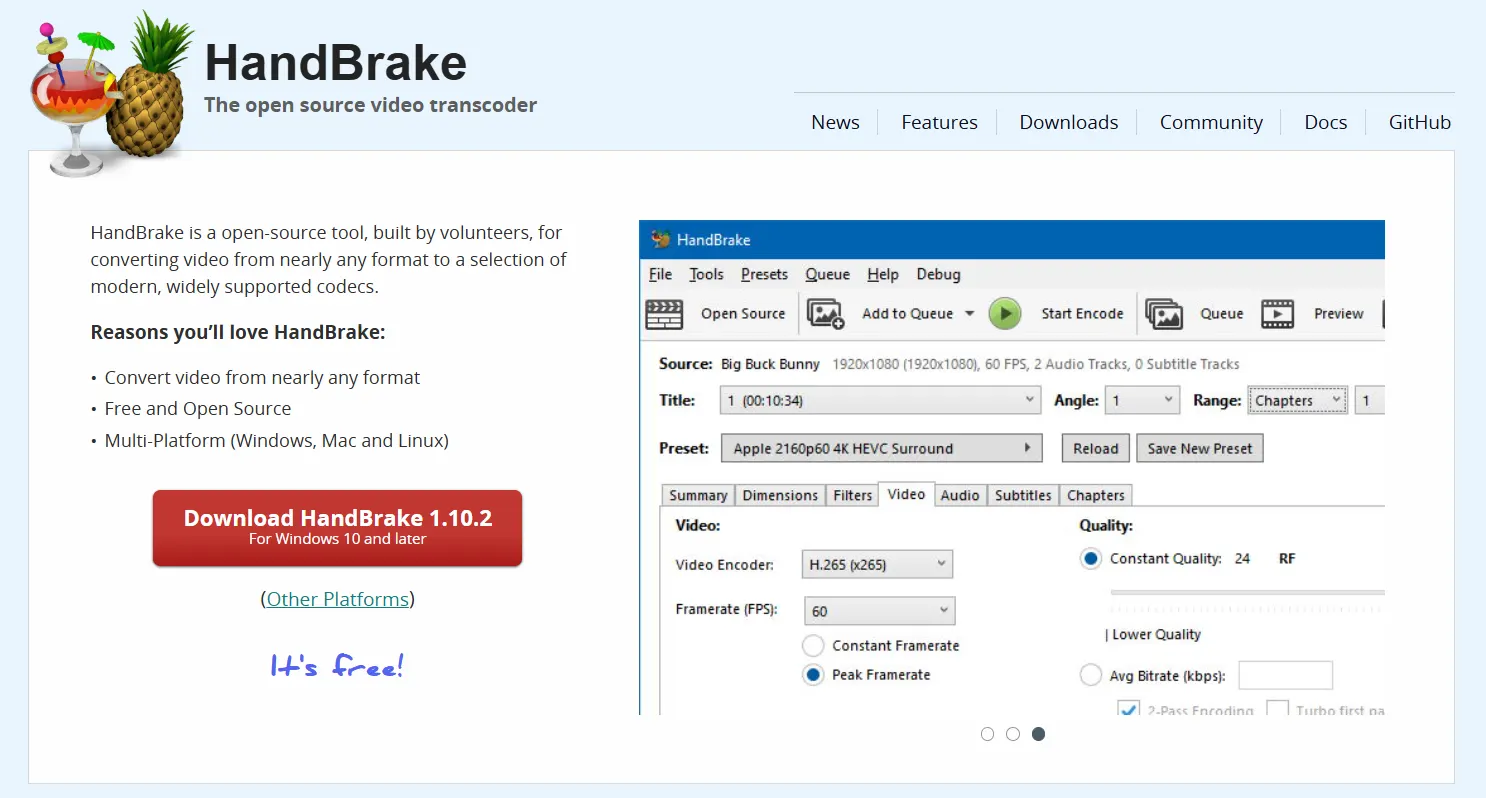
Free (open source).
2. Wistia - Best for video hosting, video delivery, and performance optimization
Wistia is a video marketing tool that helps you optimize videos after they’re published. If you want to embed a video(s) on your website and you care about how it loads, how long people stay, and what they do next, Wistia gives you the hosting and the visibility to improve all of it. It’s built for video marketers first, but we find it’s just as useful for anyone trying to connect views to real outcomes.
Key features
- Professional hosting designed for website embeds
- Viewer analytics, including heatmaps and audience insights
- Lead capture tools (like in-video forms, depending on the plan)
- Advanced controls for video embeds + SEO settings to help videos show up and behave the way you want
- Marketing integrations (tier-dependent)
Pricing
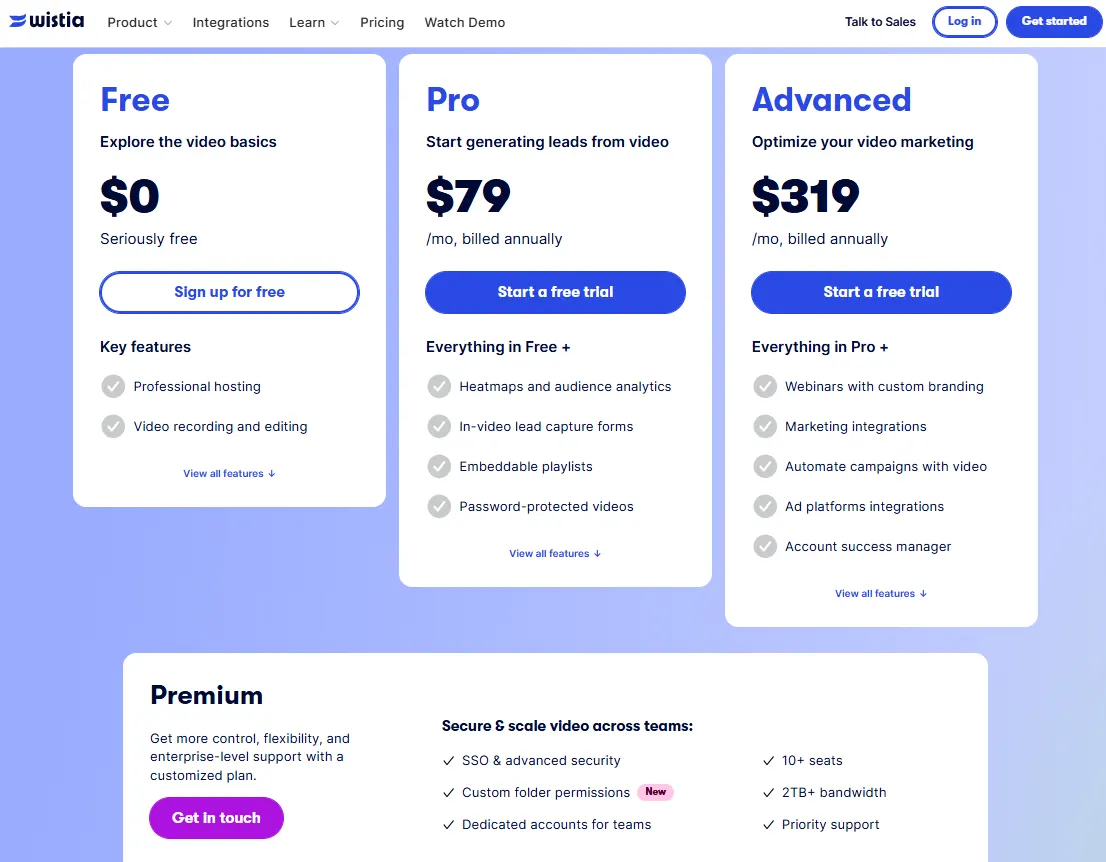
Wistia lists a Free plan ($0), plus paid plans starting at $79/month billed annually (Pro) and $319/month billed annually (Advanced). They’ve also got a Premium plan available, though you need to get in touch with their team for a custom quote.
3. vidIQ - Best YouTube video optimization tool for metadata and SEO optimization
If your idea of video optimization is better titles, better keywords, better CTR, better search visibility, vidIQ is one of the strongest tools in that lane.
Namely, it's a YouTube video optimization tool focused on helping creators and brands improve discoverability and growth through keyword research, competitive intel, and optimization suggestions. It also has a large user base and consistently solid review scores on G2.
Key features
- Keyword ideas and suggestions to help you target search demand
- Optimization recommendations to drive more views (titles, metadata, packaging)
- Competitive intel so you can spot what’s working in your niche
- Thumbnail tools to iterate faster on click-worthy designs
- AI Coach (“Deep Thinking”) plus AI credits for clipping and shorts generation
Pricing
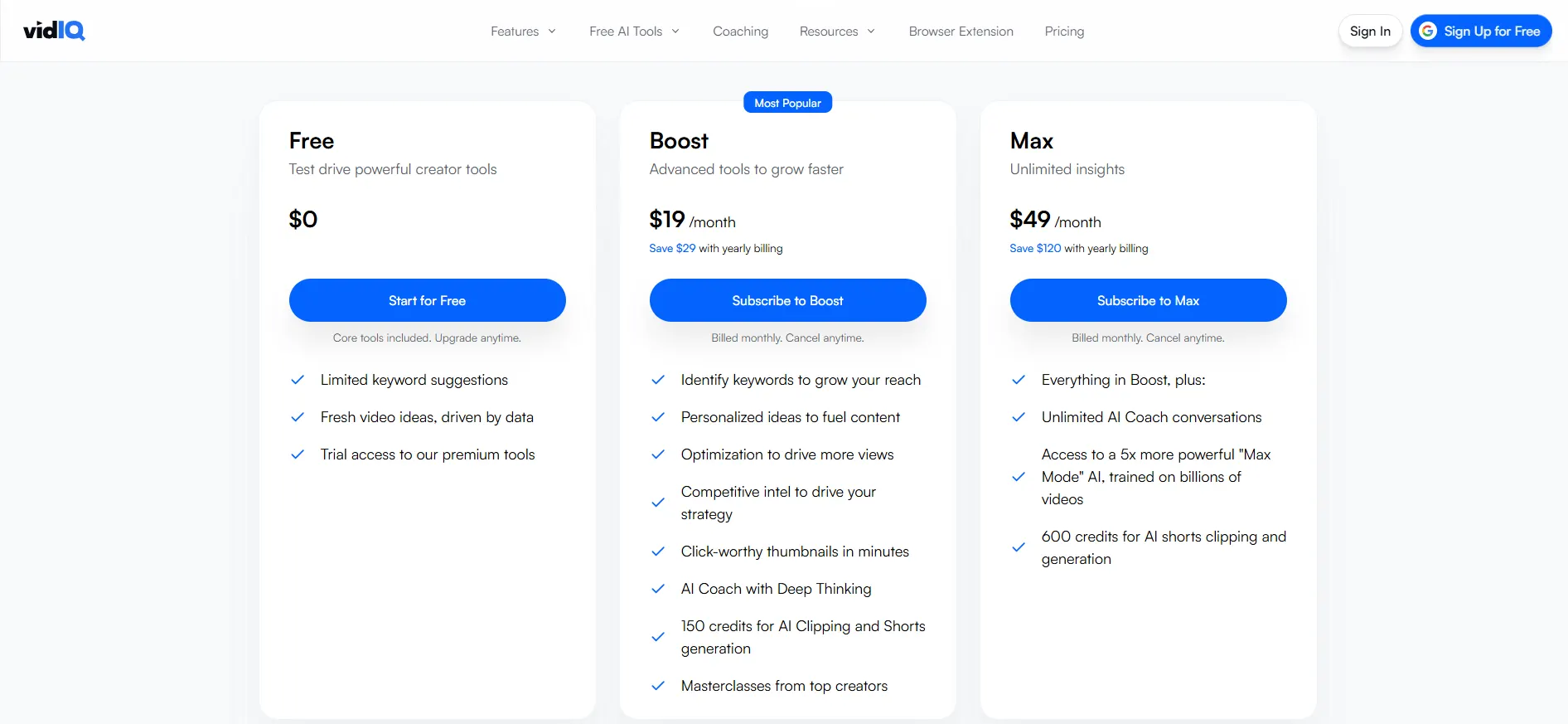
vidIQ offers a Free plan ($0), albeit with limited features locked behind a paywall. Paid plans start with Boost at $19/month, and Max at $49/month. Max also includes higher AI limits (like unlimited AI Coach conversations) and more credits for AI shorts generation.
4. Plainly Videos - Best for video content personalization and versioning optimization
Plainly is a video automation software for teams that want to optimize performance by producing more relevant video variants, without multiplying manual work.
Instead of optimizing one video, Plainly helps you optimize outcomes by creating many versions (different languages, offers, customer names, product scenes, CTAs, etc.) from the same base After Effects template, then rendering at scale via web app or API. That’s a different (and extremely powerful) kind of optimization, especially for lifecycle marketing, paid campaigns, and personalization.
Key features
- Cloud-based rendering for After Effects templates
- Data-driven video optimization
- Bulk video editor capabilities
- 20+ native integrations to plug into the rest of your stack
- Extensive API documentation
- Enterprise-grade security (ISO 27001 certified and 100% GDPR compliant)
Pricing
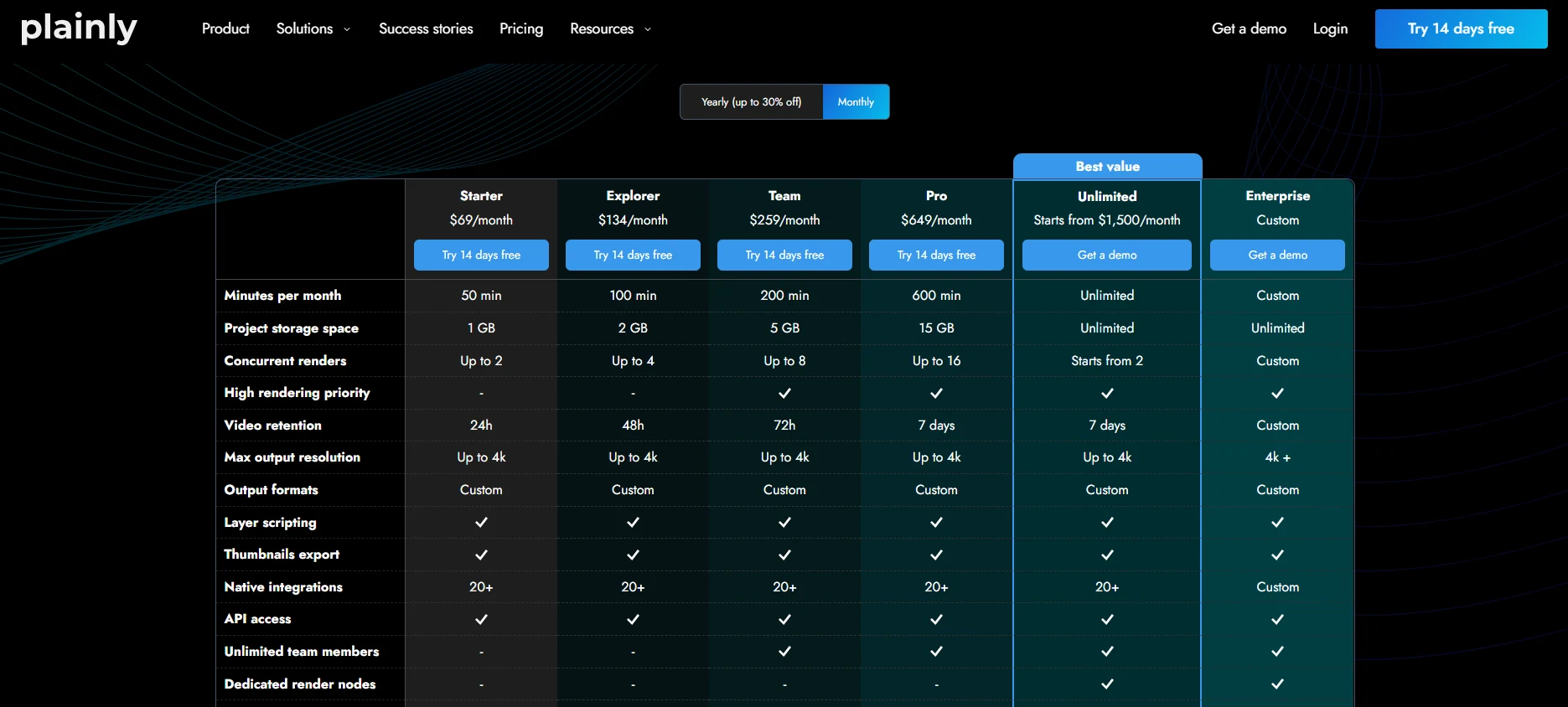
Plainly’s pricing is usage-based, meaning you pay based on how many render minutes you consume each month.
The Starter plan starts at $69/month and includes 50 render minutes, which is usually enough for small-to-mid-scale projects, testing templates, or running a few personalized campaigns without committing to bigger volume.
As your output grows, you can scale up through higher tiers:
- Explorer - $134/month for 100 minutes
- Team - $259/month for 200 minutes
- Pro - $649/month for 600 minutes)
And if you’re running high-volume, always-on personalization (think thousands of versions per month), the Unlimited plan is $1,500/month and includes unlimited rendering and storage, with custom Enterprise plans available for larger or more complex needs.
Pick the best video optimization tool for your pain point
Video optimization is one of those things you only notice when it’s missing. A video that buffers, looks fuzzy, especially on mobile devices, or dies in the first five seconds costs you the thing you can’t buy back: attention.
And in 2026, attention is pricey.
The good news is, you don’t need one “best” tool to improve user experience. You need the best video optimization tool for the problem you’re trying to fix.
Here’s the cheat sheet:
- If you’re dealing with large video sizes and slow playback, start with HandBrake to compress video content and pick the best video format that doesn't lower the quality.
- If you’re embedding videos on your site and want smooth delivery and real analytics, go with Wistia.
- If YouTube is your main channel and you want better rankings and clicks, vidIQ helps you tighten metadata, keywords, and packaging.
- If you’re trying to improve performance by making more relevant versions without cloning your workflow, Plainly is the move.
Speaking of Plainly, if you want to see how to turn one template into 100s of high-performing variants, book a demo with us to get a 360-walkthrough of the entire process!



