
Manual video editing vs template-based video automation


Summarize with





Your team is producing more video than ever. Budgets didn’t scale. You’re expected to ship faster, in more formats, without more headcount.
Creative operations managers face this choice daily: continue with the manual workflows your team knows, or explore automation platforms that promise speed and scale. Both camps have strong opinions, but most of the conversation misses the point.
This isn't about declaring a universal winner. Manual editing and template-based automation solve fundamentally different problems, and the "right" choice depends entirely on your content types, production volume, and business constraints.
By the end of this guide, you'll have a clear framework for evaluating which approach fits your specific production needs. We'll break down how each methodology works, compare them side-by-side, and show you exactly when manual editing is necessary versus when automation makes business sense.
TL;DR
- Manual editing = creative control, low scale - Best for story-driven, high-impact content where every frame matters. It requires skilled editors, takes 8–20+ hours per video, and scales linearly with team time. Ideal for <10 videos/month where differentiation justifies the cost.
- Automation = scale, speed, consistency - Built for structured, repeatable formats. After upfront template setup, per-video costs drop ~80%, and hundreds of variations can be produced quickly. Ideal for 50+ videos/month, personalization, ads, and rapid testing.
- The decision depends on volume and structure - If your content changes creatively each time, manual wins. If the format stays the same but data changes, automation turns editing into a data workflow.
- Most mature teams use both - Manual editing for hero and brand-defining work. Automation for repetitive, performance-driven content that needs to scale efficiently.
What is manual video editing?
Manual video editing is the traditional, hands-on approach where editors make individual creative decisions for every element in a video. Every cut, transition, effect, color adjustment, and audio tweak requires human judgment and creative input. It's frame-by-frame work where you're building the narrative piece by piece, making intentional choices about pacing, emotion, and visual storytelling.
This is the approach you've seen in every film you've watched, every high-end commercial, and most professional video content. After watching a finished video, you can't tell what software was used to edit it, but you can feel when an experienced editor made thoughtful decisions throughout.
How manual editing works
The manual editing workflow follows a structured process, but there's significant creative flexibility within each phase.
You start by importing raw footage into non-linear editing (NLE) software and organizing clips into bins or folders. Then comes the review process: watching all footage, selecting the best takes, and identifying moments worth including. This alone can take hours for longer projects.
Next, you arrange clips on a timeline, trimming and adjusting timing to build a rough cut. This is where narrative decisions happen - which shots tell the story most effectively? What pacing creates the right emotional response? Should you cut on action or let a moment breathe?
Once the structure exists, you refine. You add transitions between scenes, apply color grading to establish mood and visual consistency, layer in motion graphics or text overlays, and mix audio levels across dialogue, music, and sound effects.
The time investment varies wildly based on project complexity, but even straightforward edits require significant hours. We're talking about importing footage, building rough cuts, refining edits through multiple revisions, and completing final color correction and audio mixing before export. A 5-minute video might take 8-20 hours of editing time depending on complexity and creative requirements.
Popular manual editing software
Three platforms have dominated professional video editing for years, each with distinct strengths that appeal to different types of creators and workflows. Your choice depends on how the software fits your existing tools and which specialized features your workflow demands.
Premiere Pro
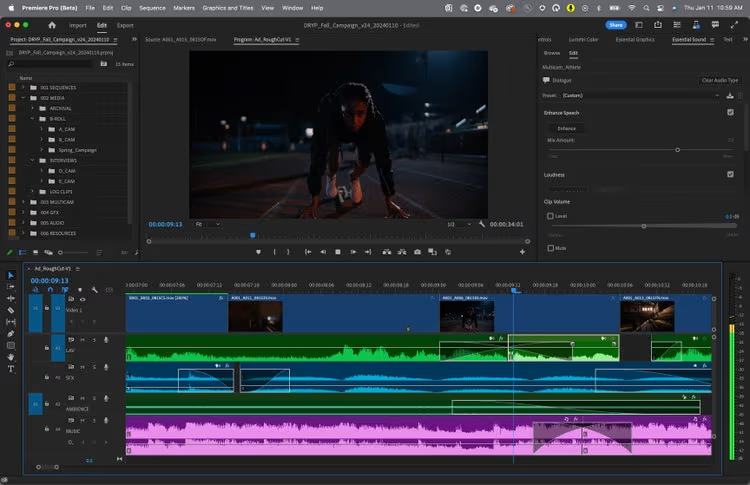
Premiere Pro remains the industry standard for professional video editing. It offers a comprehensive toolset for all editing needs, from basic cuts to complex multi-cam sequences. The real advantage is seamless integration with After Effects for motion graphics and the broader Adobe ecosystem. If your team already uses Adobe Creative Cloud, Premiere Pro fits naturally into existing workflows.
After Effects
After Effects serves a different purpose - it's specialized for motion graphics, visual effects, and animation. While you can edit in After Effects, it's typically used for creating complex compositions and advanced visual treatments that you then import into Premiere Pro or other NLE software. Think animated titles, composited green screen work, intricate visual effects sequences, or After Effects automation for scaled content production.
DaVinci Resolve
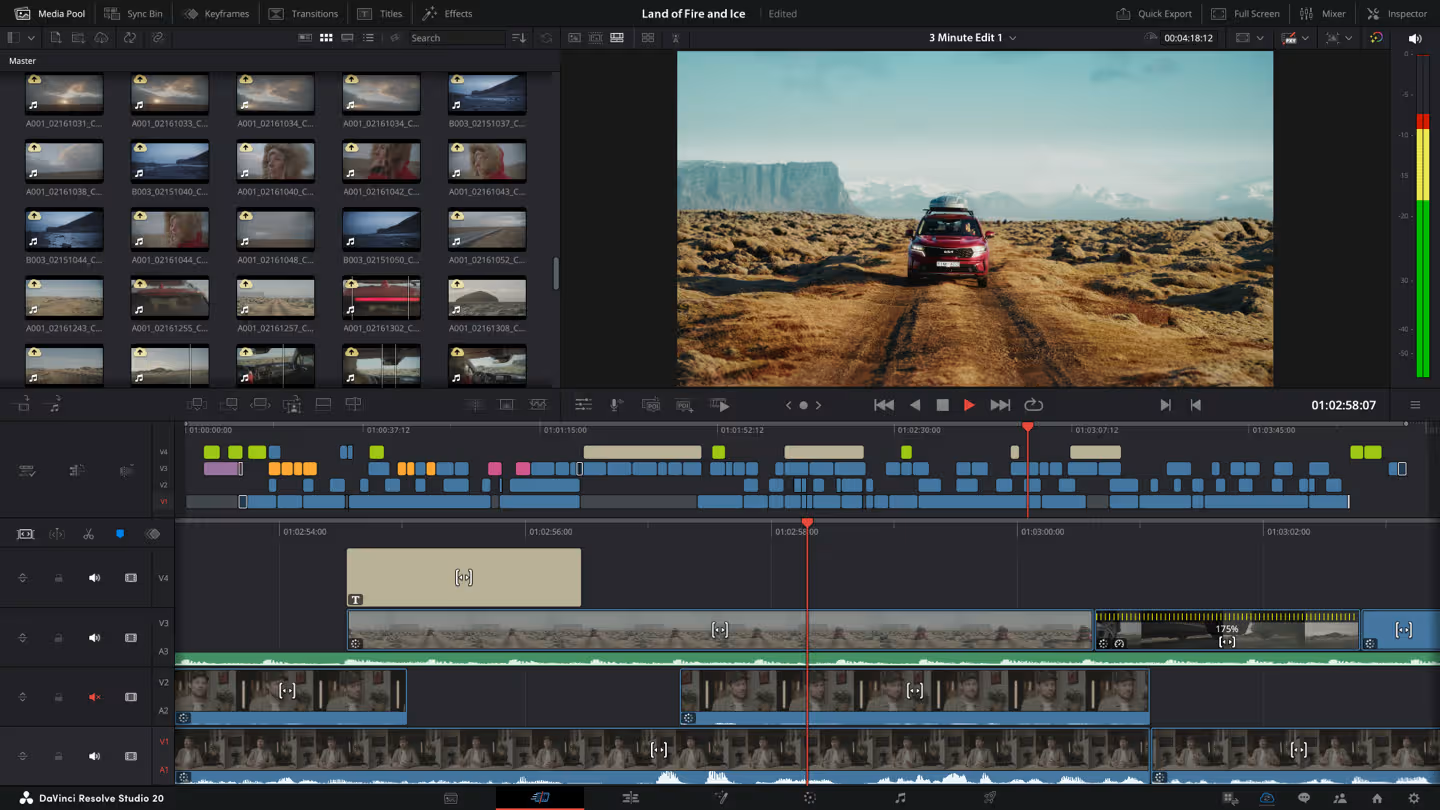
DaVinci Resolve is a comprehensive video editing and color grading powerhouse that combines professional editing, color correction, visual effects, motion graphics, and audio post-production in a single application. Originally renowned as the industry-standard color grading tool used in Hollywood productions, Resolve has evolved into a full-fledged NLE that rivals Premiere Pro
Who uses manual editing and why
Manual editing makes the most sense when full creative control is non-negotiable.
You’ll typically see it used by:
- High-end production teams - Film studios, commercial agencies, and brands producing hero content where every creative decision matters. You can’t template your way to a Super Bowl commercial or a flagship brand film.
- Creators with a distinctive style - YouTubers, documentary filmmakers, and creative directors who rely on precise pacing, emotional timing, and narrative nuance.
- Teams working on complex or experimental projects - Where visual effects, layered motion graphics, or evolving creative direction require flexibility throughout the process.
From a business perspective, manual editing is usually the right fit when:
- You’re producing fewer than 10 videos per month
- Each video carries a significant brand or revenue impact
- Creative differentiation justifies the time investment
- The process itself drives innovation, not just output
For example, a product launch film may go through multiple structural revisions before the final narrative locks in. That flexibility is difficult to systematize.
The tradeoff is scale. Manual workflows grow linearly with team hours, more output requires more editors, more revision cycles, and tighter coordination. Even straightforward projects can require 8–20+ hours once finishing work is included.
The real question isn’t whether manual editing is better. It’s whether your production model supports that level of creative investment.
What is template-based video automation?
Template-based video automation is software-driven video creation where you design one master template, mark which elements change, and let the system automatically generate dozens, hundreds, or thousands of unique video versions by swapping in different data.
It works like placeholders in email campaigns. You write one email template, insert placeholders for name, company, or offer, and the system generates personalized versions for thousands of recipients. In video automation, the placeholders aren’t just text; they can be images, video clips, voiceovers, or entire scenes.
This isn't AI generating videos from scratch based on text prompts. We're talking about systematic, data-driven variation of professionally designed video templates, where you control the design and the automation handles the repetitive manual work of changing the data and rendering everything locally.
How template-based video automation works
The workflow breaks into three phases:
- template design
- data connection
- automated rendering.
First, designers create a master video template in tools like After Effects. They build the complete visual design - animations, transitions, branding, effects - exactly as they would for a single video. The difference comes in marking which elements are dynamic: text layers, image placeholders, video clips, or audio tracks that will change for each variation.
Once the template is ready, you connect it to a data source. This could be a CSV file with customer names and offer details, a spreadsheet with product specifications, an API feeding real-time data, or a database holding your customer data. The automation platform reads this data and knows exactly which values to populate in each template placeholder.
Then comes the rendering process. The automation software generates each video variation by populating the template with specific data values, then renders all versions automatically in the cloud. Need 100 personalized videos? A bulk video editor processes them all without manual intervention. Need 1,000 product videos? Same workflow, just more data rows.
The setup versus execution trade-off is where automation shines. Template creation requires real design work upfront, but once you've built and tested that template, producing the next 500 videos takes almost no additional time. The upfront investment pays off at scale.
Popular video automation platforms
Different platforms serve different production needs, and the right choice depends on whether you prioritize design flexibility, ease of use, or specific content types.
Plainly Videos
Plainly Videos integrates with After Effects templates to automate video production at scale. Create your motion graphics once, then generate thousands of variations using CSV files, APIs, or integrations like spreadsheets, Airtable, Zapier and more. The platform handles data-driven video creation for scaling creative output, ads versioning, product videos, social media content and personalized videos. You don't need coding knowledge for basic automation, but developers can use the API for complex workflows.
Idomoo
Idomoo is an personalized video platform built for financial institutions, gaming companies and telecom providers who need to deliver millions of unique videos at scale. Unlike basic template tools, it dynamically adapts entire narrative structures, scenes, and voiceovers based on individual viewer data - not just text overlays. Think customer onboarding videos, year-in-review summaries, or targeted campaigns where each recipient gets a completely unique experience. The platform includes interactive elements, real-time data integration, and analytics to track ROI.
HunchAds
Hunch specializes in video ad automation for digital advertisers running campaigns on Facebook, Instagram, and similar platforms. It creates dynamic video ads at scale, letting you test different headlines, CTAs, product images, pricing, and messaging without manually editing each version. The platform integrates with product catalogs to automatically generate personalized video ads based on user behavior, demographics, or purchase history.
Who uses video automation and why
Video automation makes sense when you’re producing high volumes of similar content and turnaround time matters. It’s built for situations where the structure stays the same, but the data inside the video needs to change.
- Performance marketing teams - Generate hundreds of ad variations by swapping headlines, offers, visuals, and CTAs through data.
- E-commerce - Turn product feeds into catalog-scale videos without manual editing per SKU.
- Enterprise teams - Produce onboarding, training, and internal updates in consistent branded formats.
- Real estate platforms and agencies - Create listing videos automatically from property data, images, and location details.
- Franchise or multi-location brands - Localize the same campaign with different store details, offers, or contact info.
- Media publishers - Convert articles, rankings, or sports stats into repeatable video formats.
- Tech companies - Integrate a video editing API into their product or internal workflows to generate videos automatically, whether for their own marketing and operations or directly for their users inside the platform.
Video automation makes business sense when you're:
- Producing 50+ videos monthly
- Working with structured content that fits templates
- Personalizing content at scale
- Facing tight turnaround requirements that manual editing can't meet
If your production workflow involves repeating the same edits with different data, automation turns that repetitive work into a data problem rather than an editing problem.
Side-by-side comparison
You've learned how each approach works. Now you need to know which one fits your production requirements and business constraints. This comparison cuts through the marketing claims to focus on the operational realities that actually matter when you're planning production capacity and budgets.
When creative control and narrative precision matter most, manual editing is the better fit. It gives teams flexibility to shape the story as it evolves.
Automation performs better when volume, speed, and consistency drive results. The upfront template work pays off once production scales.
Finding the right approach for your video production needs
The smartest teams aren't ditching one or the other. They're using both: manual for high-stakes creative work, template-based video automation for repetitive tasks that need to scale. Your editors focus on the work that actually differentiates your brand while automation cranks out the repetitive stuff that used to eat their days.
If you're evaluating where to start with automation, pick one repetitive video type that's eating up your team's time. Keep your manual workflows for creative flagship content, but automate that one task. You'll free your creative team to focus on high-value, strategic work instead of churning out the same edits with different data.
Ready to explore how template-based automation can complement your existing manual editing workflow? Book a demo with Plainly Videos to see what's possible when you use the right approach for each production challenge.



